
Microsoft Dynamics vs. Salesforce Comparison Summary
Salesforce wins for enterprises prioritizing best-in-class CRM functionality, extensive third-party integrations, and AI-powered sales automation. Microsoft Dynamics 365 wins for organizations already invested in the Microsoft ecosystem that need unified CRM and ERP capabilities with deep Office 365 integration.
Still unsure which platform fits your specific needs? Read our detailed comparison below or contact Capital S Consulting for expert guidance.
- Who each platform fits: Salesforce serves enterprises requiring advanced CRM functionality and extensive customization; Microsoft Dynamics 365 serves organizations needing integrated CRM-ERP solutions within the Microsoft ecosystem
- Time-to-value insights: Salesforce typically requires 3-6 months for full enterprise deployment; Dynamics 365 implementations range from 5-12 months depending on ERP integration complexity
- TCO considerations: Salesforce costs escalate with add-ons and storage; Dynamics 365 offers predictable pricing but requires significant implementation investment for complex deployments
Our comparison focuses on four critical factors that determine long-term CRM success:
Implementation Complexity
Microsoft Dynamics 365 requires substantial implementation planning due to its combined CRM-ERP architecture. Implementation costs typically range from 2-5x the annual license cost, according to industry analysis, with enterprise deployments requiring 5-12 months. The platform's complexity provides comprehensive business functionality but demands significant technical expertise.
Salesforce implementations are more straightforward for pure CRM needs, typically requiring 3-6 months for full deployment. However, achieving comprehensive business process coverage often requires multiple Cloud products and third-party integrations, increasing complexity.
Feature Value per Dollar
Microsoft Dynamics 365 provides exceptional value for organizations needing both CRM and ERP functionality. The platform includes finance, supply chain, manufacturing, and customer service capabilities in unified licensing. Sales Professional starts at $65/user/month, with Enterprise at $105/user/month.
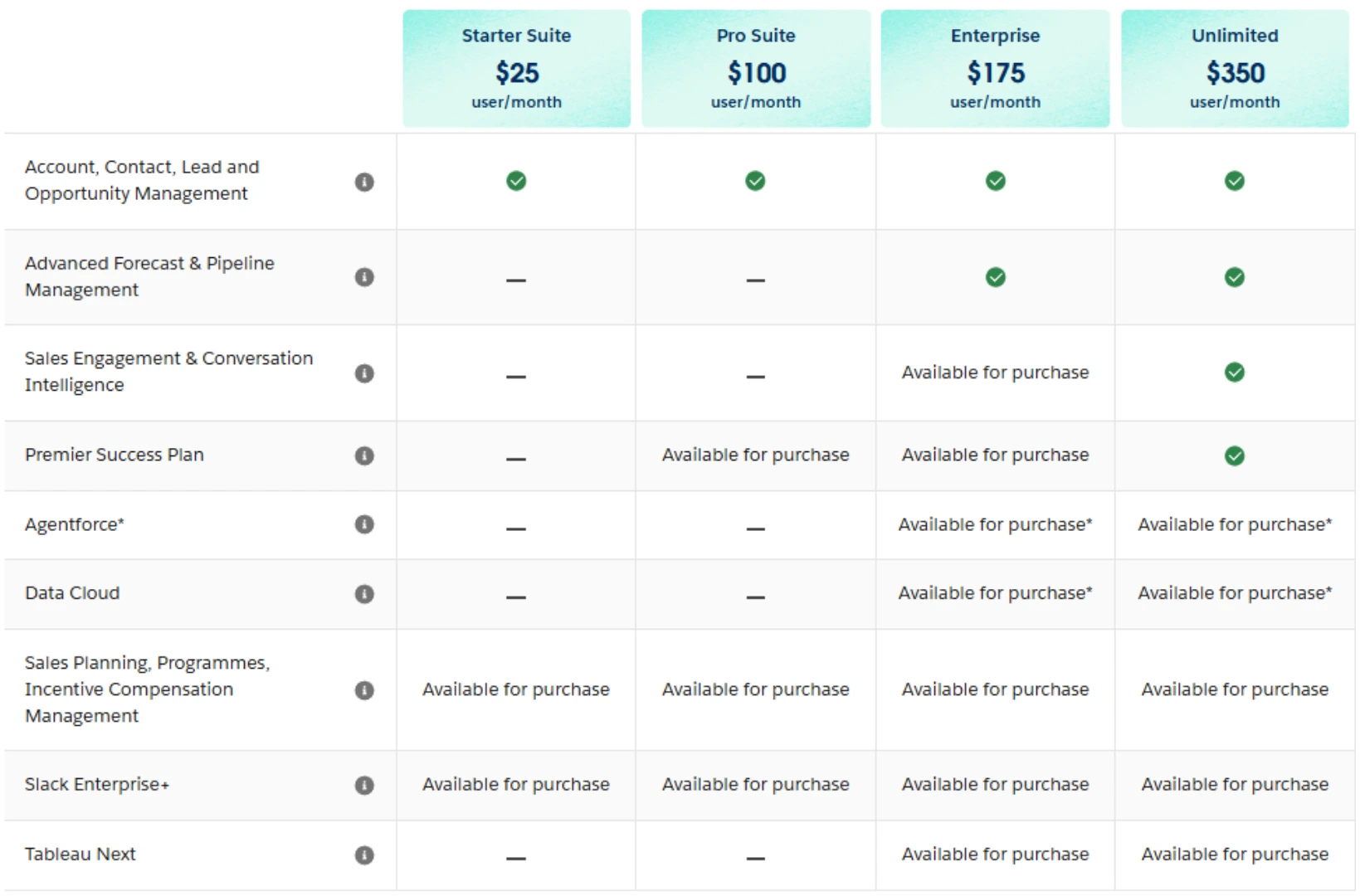
Salesforce offers best-in-class CRM functionality but requires separate licensing for different capabilities. Sales Cloud Enterprise starts at $175/user/month, with Marketing Cloud and Service Cloud requiring additional investments. Total costs can escalate quickly as organizations add required functionality.
Scalability and Customization
Dynamics 365 offers unlimited customization through the Power Platform and supports both cloud and on-premises deployment. The platform scales from small businesses to large enterprises with consistent architecture. However, customizations require Microsoft development expertise.
Salesforce provides extensive customization through its Lightning Platform and massive AppExchange marketplace. The platform scales exceptionally well but customizations can become complex and expensive. Enterprise-level customizations often require dedicated Salesforce development teams.
Integration Ecosystem
Microsoft Dynamics 365 provides native integration with Office 365, Teams, SharePoint, Power BI, and LinkedIn. The unified Microsoft ecosystem reduces integration complexity and costs. API access is included in standard licensing.
Salesforce offers extensive third-party integrations through AppExchange but relies on connectors for Microsoft ecosystem integration. The platform excels at connecting diverse business applications but integration costs can accumulate with complex requirements.
Overview
Microsoft Dynamics 365 combines CRM and ERP capabilities in a unified business platform, eliminating data silos between sales, finance, operations, and customer service. The platform provides comprehensive business functionality with native integration across the Microsoft ecosystem.
Quick Summary Box
- Platform strength: Comprehensive CRM-ERP integration within Microsoft ecosystem
- Integration reality: Native Microsoft connectivity; third-party integrations require development
- Custom work indicator: Significant customization capabilities but requires Microsoft technical expertise
- Cost insight: Predictable licensing with substantial implementation investment
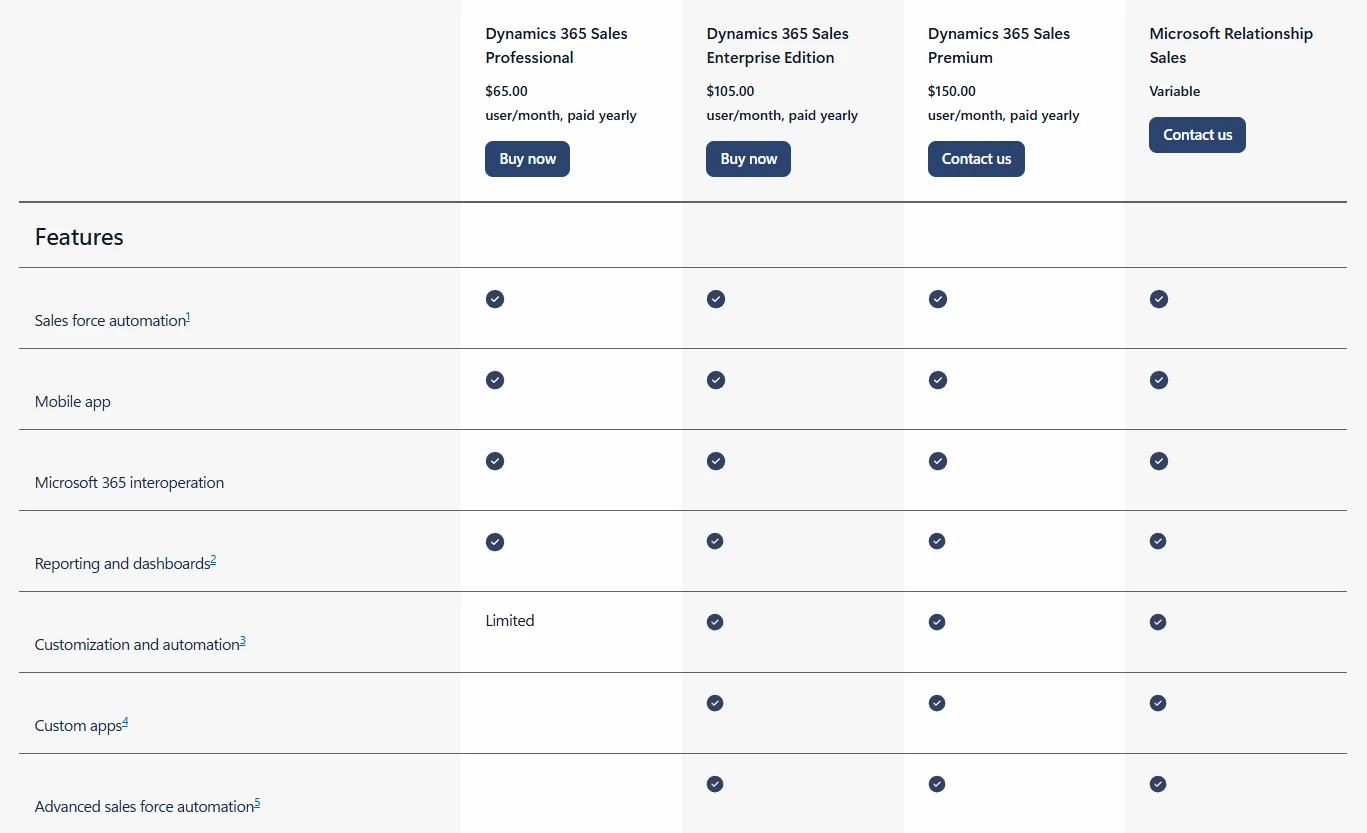
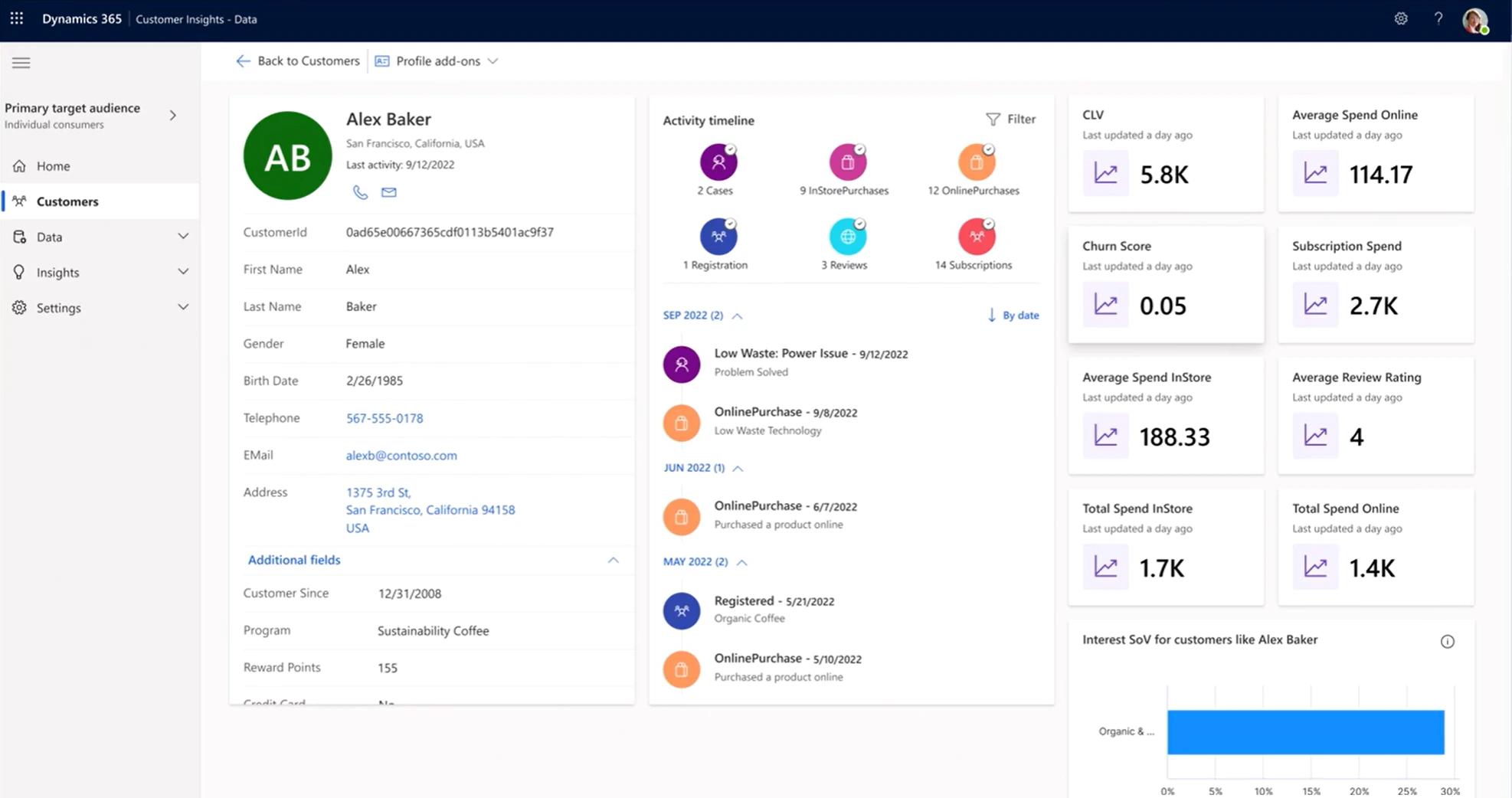
Microsoft Dynamics 365 offers modular pricing for different business functions:
- Sales Professional: $65/user/month - Core sales functionality with basic automation
- Sales Enterprise: $105/user/month - Advanced sales features with AI capabilities
- Customer Service Professional: $50/user/month - Basic customer service functionality
- Customer Service Enterprise: $95/user/month - Advanced service features with field service
- Business Central Essentials: $70/user/month - Small business ERP and CRM
- Business Central Premium: $100/user/month - Full ERP including manufacturing
- Finance: $180/user/month - Enterprise financial management
- Supply Chain Management: $180/user/month - Advanced supply chain functionality
Pricing verified December 2025, subject to change
What Stands Out About Microsoft Dynamics 365
Unified Business Platform: Dynamics 365 combines CRM and ERP capabilities in a single platform, eliminating data silos between sales, finance, operations, and customer service. This integration provides complete visibility across business functions.
Native Microsoft Integration: Seamless connectivity with Office 365, Teams, SharePoint, Power BI, and LinkedIn Sales Navigator creates a unified work environment. Users can access CRM data directly within familiar Microsoft applications.
AI-Powered Insights: Microsoft Copilot provides AI assistance across all business functions, from sales forecasting to financial analysis. The platform includes predictive analytics and automated data entry capabilities.
Flexible Deployment Options: Organizations can choose cloud, on-premises, or hybrid deployments based on security and compliance requirements. This flexibility supports diverse business needs and regulatory environments.
Power Platform Integration: Native integration with Power BI, Power Apps, and Power Automate enables custom applications and automated workflows without separate licensing costs.
Who It's Best For
Our take: Microsoft Dynamics 365 stands out for organizations requiring comprehensive business platform integration, particularly when teams already use Microsoft productivity tools extensively. From a CRM implementation perspective, we've found that organizations achieve exceptional value when they need both CRM and ERP functionality, as the unified platform eliminates costly integration projects between separate systems.
However, the platform's complexity requires significant implementation planning and Microsoft ecosystem expertise. Organizations focused purely on CRM functionality may find simpler alternatives more cost-effective. For businesses wanting integrated CRM-ERP capabilities within the Microsoft environment, Dynamics 365 often provides superior workflow automation and business intelligence than competitive solutions.
Overview
Salesforce operates as the world's leading cloud-based CRM platform, providing comprehensive sales, service, marketing, and commerce capabilities. The platform emphasizes AI-powered automation, extensive customization, and the largest business application ecosystem.
Quick Summary Box
- Platform strength: Industry-leading CRM with advanced AI and automation capabilities
- Integration reality: Extensive AppExchange marketplace; Microsoft ecosystem requires connectors
- Custom work indicator: Highly customizable but can become complex and expensive at scale
- Cost insight: Competitive entry pricing with costs escalating through add-ons and usage
Pricing Snapshot
Salesforce offers tiered pricing for different business needs:
Sales Cloud:
- Starter: $25/user/month (up to 10 users) - Basic CRM functionality
- Professional: $100/user/month - Advanced sales features and automation
- Enterprise: $175/user/month - Complete sales automation with AI capabilities
- Unlimited: $350/user/month - Full customization and premium support
Service Cloud:
- Professional: $100/user/month - Customer service management
- Enterprise: $175/user/month - Advanced service automation
- Unlimited: $350/user/month - Complete service platform
Marketing Cloud: Starting at $1,250/month for small business editions, with enterprise editions reaching $3,250+/month
Pricing verified December 2025 following August 2025 price increase averaging 6%
What Makes Salesforce a Market Leader
Einstein AI Integration: Salesforce Einstein provides AI-powered lead scoring, opportunity insights, automated activity capture, and predictive forecasting. The platform includes conversation intelligence and automated email responses.
Lightning Platform: The Lightning Platform enables custom applications, workflow automation, and integration development. Organizations can build industry-specific solutions while maintaining upgrade compatibility.
Extensive AppExchange: The world's largest business application marketplace provides thousands of pre-built integrations and specialized solutions. This ecosystem reduces custom development requirements for most business needs.
Advanced Automation: Salesforce offers sophisticated workflow automation, approval processes, and business rule management. The platform supports complex sales processes and compliance requirements.
Multi-Cloud Integration: Sales Cloud, Service Cloud, Marketing Cloud, and Commerce Cloud work together seamlessly, providing complete customer lifecycle management within a single platform.
Who It's Best For
Our take: Salesforce excels as a pure CRM platform, particularly when organizations need advanced sales automation, extensive customization options, and best-in-class AI capabilities. From our CRM implementation experience, teams typically achieve faster user adoption due to Salesforce's intuitive interface and comprehensive training resources.
However, total costs can escalate quickly as organizations add required functionality through multiple Cloud products and AppExchange solutions. The platform requires ongoing administration and can become complex with extensive customizations. For organizations prioritizing CRM excellence and willing to invest in platform expertise, Salesforce often provides superior sales automation and customer engagement capabilities than integrated business platforms.
Still running critical processes on spreadsheets and email?
Enterprise platforms only deliver value when they're implemented to match how your team actually works
CRM Core Capabilities and Pipeline Management
Microsoft Dynamics 365 provides solid pipeline management with customizable deal stages, territory management, and native integration with Microsoft productivity tools. The platform includes opportunity scoring, sales forecasting, and automated pipeline progression. Advanced features require higher-tier licensing.
Salesforce offers the most comprehensive pipeline management with multiple pipeline support, advanced territory management, collaborative forecasting, and Einstein AI insights. The platform includes deal coaching, competitive analysis, and sophisticated pipeline analytics.
Winner: Salesforce - Most advanced pipeline management with superior forecasting and AI-powered insights.
Sales Automation and AI Capabilities
Dynamics 365 provides enterprise-level sales automation with Copilot AI assistance, workflow automation, and native Outlook integration. The platform includes email tracking, sequence automation, and activity logging within familiar Microsoft applications.
Salesforce delivers the most sophisticated sales automation with Einstein AI recommendations, advanced workflow rules, comprehensive email marketing integration through Marketing Cloud, and intelligent activity capture. The platform supports complex approval processes and business rule automation.
Winner: Salesforce - Most advanced sales automation with superior AI capabilities and email marketing integration.
Marketing, Lead Management, and Customer Journey Tools
Salesforce provides advanced lead capture with sophisticated web forms, landing page builders, Marketing Cloud integration, and comprehensive lead scoring. The platform includes social media monitoring and lead nurturing automation.
Dynamics 365 offers solid lead generation capabilities with LinkedIn integration, basic web forms, and lead scoring functionality. The platform includes social selling insights but requires Marketing modules for comprehensive lead generation.
Winner: Salesforce - More comprehensive lead generation and nurturing capabilities.
Customer Service and Case Management
Salesforce Service Cloud provides industry-leading customer service management with omnichannel support, knowledge management, field service automation, and comprehensive case routing. The platform includes AI-powered case resolution and customer self-service.
Microsoft Dynamics 365 Customer Service offers solid service management with case routing, knowledge base functionality, and field service integration. The platform includes AI insights but with less comprehensive service automation than Salesforce.
Winner: Salesforce - Industry-leading customer service capabilities with superior automation and AI features.
Reporting, Analytics, and Business Intelligence
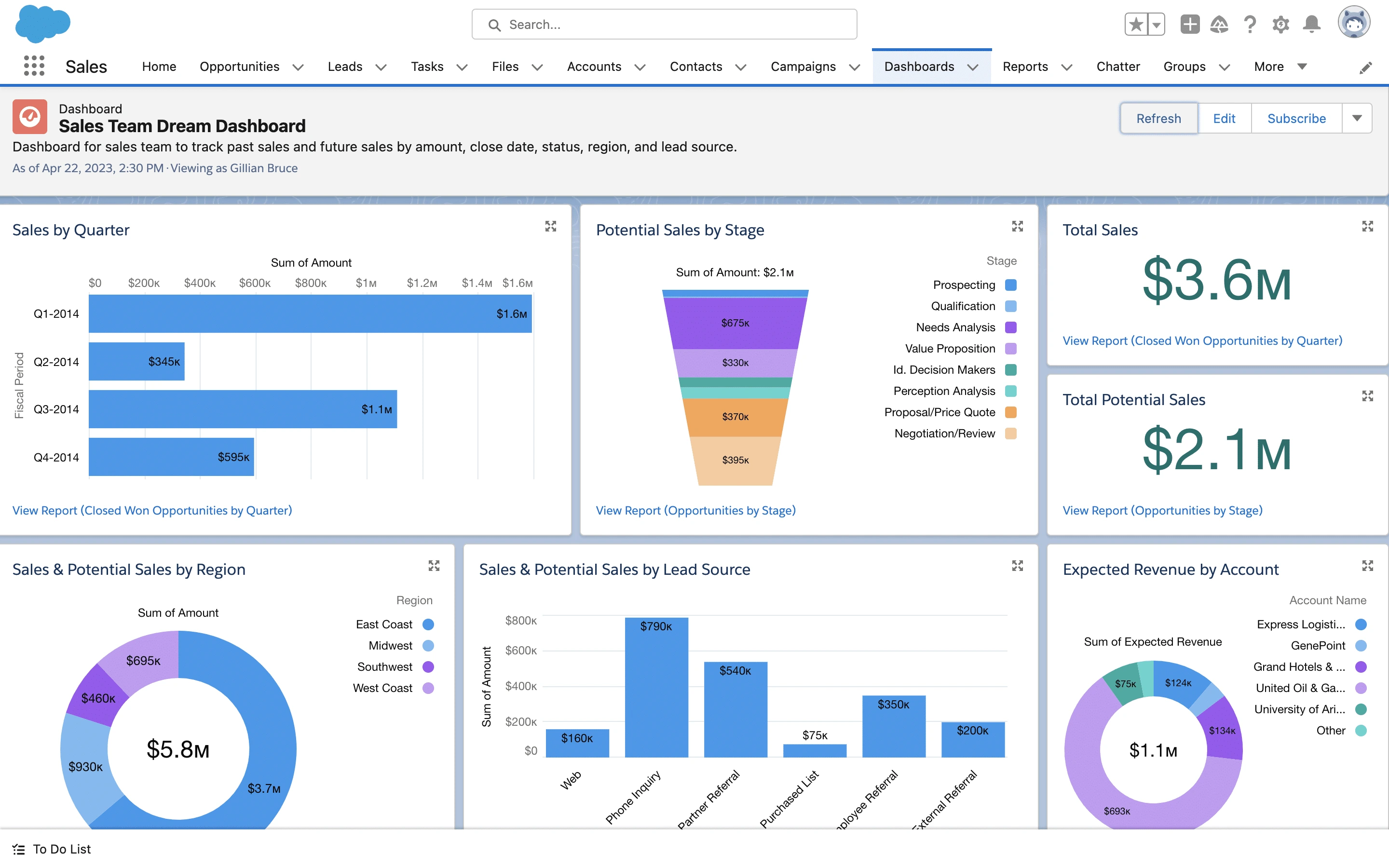
Salesforce offers advanced CRM analytics with Einstein Analytics, comprehensive dashboard creation, real-time reporting, and sophisticated forecasting capabilities. The platform includes industry-specific analytics and AI-powered insights.
Microsoft Dynamics 365 provides powerful business intelligence through native Power BI integration, cross-functional reporting, and comprehensive business analytics. The platform excels at unified reporting across CRM and ERP functions.
Winner: Microsoft Dynamics 365 - Superior business intelligence capabilities through Power BI integration and unified reporting.
Customization, Flexibility, and Development Options
Dynamics 365 offers unlimited customization through Power Platform, native Microsoft ecosystem integration, and flexible deployment options. The platform supports complex business requirements but requires Microsoft development expertise.
Salesforce provides extensive customization through Lightning Platform, the largest business application marketplace (AppExchange), and sophisticated API management. The platform supports complex customizations but can become expensive and complex at scale.
Winner: Tie - Both platforms offer extensive customization with different strengths: Dynamics 365 for Microsoft ecosystem integration, Salesforce for CRM-specific customization.
Integrations and Ecosystem Strength
Microsoft Dynamics 365 provides native integration with Office 365, Teams, SharePoint, Power BI, and LinkedIn. The unified Microsoft ecosystem reduces integration complexity and costs. API access is included in standard licensing.
Salesforce offers extensive third-party integrations through AppExchange but relies on connectors for Microsoft ecosystem integration. The platform excels at connecting diverse business applications but integration costs can accumulate with complex requirements.
Winner: Microsoft Dynamics 365 - Best integrated communication tools through native Microsoft ecosystem connectivity.
Ease of Use and User Adoption Curve
Salesforce features the modern Lightning interface with intuitive navigation, comprehensive training resources through Trailhead, and user-friendly design. The platform prioritizes user experience and adoption.
Microsoft Dynamics 365 provides a familiar interface for Microsoft users with consistent design across business applications. However, the platform's complexity can create steeper learning curves for comprehensive business functionality.
Winner: Salesforce - More intuitive interface with superior user experience and training resources.
A platform is only as good as its implementation
Poorly configured CRMs cost more in lost productivity than the subscription itself. We get it right the first time
Microsoft Dynamics 365 Platform Ratings

Microsoft Dynamics 365:
- G2: 3.8/5 based on 1,400+ reviews
- Capterra: 4.4/5 based on 5,100+ reviews
- TrustRadius: 7.9/10 based on 700+ reviews
Users appreciate the Microsoft integration: "Seamless workflow with our existing Office tools." However, complexity is a common concern: "Powerful platform but requires significant implementation expertise."
Salesforce Platform Ratings

Salesforce:
- G2: 4.4/5 based on 24,800+ reviews
- Capterra: 4.5/5 based on 4,400+ reviews
- TrustRadius: 8.4/10 based on verified reviews
Salesforce receives praise for functionality and usability. A G2 reviewer noted: "Salesforce gives 360-degree visibility into your sales cycle." However, cost concerns emerge: "Pricing escalates quickly with additional features."
Ratings pulled from G2, Capterra, TrustRadius in December 2025. Quotes shortened for clarity
Microsoft Dynamics 365
Pros:
- Unified CRM-ERP platform eliminates data silos between business functions
- Native Microsoft ecosystem integration reduces training and adoption barriers
- Flexible deployment options support diverse security and compliance requirements
- Power Platform integration enables custom applications without additional licensing
- Predictable licensing model with comprehensive business functionality
Cons:
- Complex implementation requiring significant Microsoft ecosystem expertise
- Limited pure CRM functionality compared to specialized platforms
- Higher total cost of ownership for organizations needing only CRM capabilities
- Steeper learning curve for comprehensive business platform functionality
- Requires ongoing Microsoft technical expertise for optimal utilization
Salesforce
Pros:
- Industry-leading CRM functionality with advanced AI and automation capabilities
- Intuitive user interface with comprehensive training and support resources
- Extensive AppExchange marketplace provides solutions for diverse business needs
- Superior sales automation and customer engagement features
- Strong innovation track record with regular platform enhancements
Cons:
- Costs escalate quickly with multiple Cloud products and add-on requirements
- Complex pricing model with usage-based charges and feature limitations
- Requires dedicated Salesforce expertise for ongoing administration and customization
- Limited native integration with Microsoft ecosystem tools
- Can become overly complex with extensive customizations and multiple Cloud products
Time-to-Value Expectations
Before evaluating any platform change, document your current customer relationship management processes, pain points, and success metrics. Understanding what works and what doesn't helps determine whether you need a new platform or better optimization of your existing system.
Change Management and User Adoption
The best customer relationship management platform is the one your team actually uses consistently. Focus on customer experience, training requirements, and change management rather than just feature comparisons when making platform decisions.
Data Migration and System Integration Risks
Evaluate implementation costs, ongoing training, data migration, integration requirements, and potential productivity loss during transitions. Both platforms require substantial investments beyond licensing costs for successful deployment.
Expert Guidance from Capital S
When growing businesses evaluate CRM platforms, they often need guidance navigating the complex decision between comprehensive solutions like Microsoft Dynamics 365 and Salesforce. The choice between these platforms requires careful analysis of your business processes, technology ecosystem, and realistic growth projections.
The wrong choice costs more than money - it impacts team productivity, customer relationships, and business growth for years. Rather than making decisions based on feature comparisons alone, this decision deserves expert guidance that considers your complete business picture.
At Capital S Consulting, we help growing organizations evaluate CRM platform decisions through:
- Strategic platform assessment based on your current processes and technology needs
- Realistic implementation planning with honest timelines and budget expectations
- Vendor evaluation guidance to ensure the right fit for your business size and complexity
Every situation is different. Your business model, team dynamics, current processes, and growth trajectory all influence what approach will deliver the best results. We've seen companies achieve remarkable improvements by optimizing existing systems, while others benefited from strategic platform transitions.
Sometimes the right optimization strategy delivers better ROI than switching platforms entirely. Whether you need better configuration or a strategic platform change, the right CRM strategy can accelerate your growth while the wrong one can set you back for years.
Is Microsoft Dynamics a competitor to Salesforce? Yes, Microsoft Dynamics 365 competes directly with Salesforce in the CRM market, though they serve different use cases. Dynamics 365 offers integrated CRM-ERP functionality while Salesforce focuses on pure CRM excellence.
What's the main difference between Microsoft Dynamics and Salesforce? Microsoft Dynamics 365 combines CRM and ERP capabilities in a unified business platform with native Microsoft integration. Salesforce specializes in CRM functionality with extensive third-party integrations and AI capabilities.
When should you choose Microsoft Dynamics 365? Choose Dynamics 365 when you need integrated CRM-ERP functionality, already use Microsoft 365 extensively, require flexible deployment options, or want unified business intelligence across all functions.
When should you choose Salesforce CRM? Choose Salesforce when you prioritize best-in-class CRM functionality, need advanced AI automation, require extensive third-party integrations, or want industry-leading sales and marketing capabilities.
Which platform is better for enterprise organizations? Both serve enterprises well but differently. Salesforce excels for CRM-focused enterprises needing advanced automation. Dynamics 365 suits enterprises requiring comprehensive business platform integration.
Is it difficult to switch from Salesforce to Microsoft Dynamics (or vice versa)? Migration between platforms requires careful planning for data migration, user training, and process redesign. Both platforms offer migration tools, but expect 3-6 months for complete transitions with professional guidance recommended.
Which CRM is better for organizations already using Microsoft 365? Microsoft Dynamics 365 provides superior integration with Office 365, Teams, and SharePoint, reducing training requirements and improving user adoption for organizations already invested in the Microsoft ecosystem.
How long does CRM implementation typically take? Salesforce implementations typically range from 3-6 months for enterprise deployments. Dynamics 365 implementations often require 5-12 months due to CRM-ERP integration complexity, but provide broader business functionality.