
Quick Comparison Summary
HubSpot wins for growing businesses that need integrated marketing and sales in one platform with straightforward pricing. Pipedrive excels for sales-focused teams wanting visual pipeline management without complexity. Zoho CRM serves cost-conscious organizations needing extensive customization options. Salesforce dominates for enterprises requiring advanced automation and scalability. Still unsure? Read our detailed comparison below or contact Capital S Consulting for expert guidance.
Who each platform fits: HubSpot serves businesses needing marketing-sales alignment focused on running outbound campaigns; Pipedrive fits sales teams prioritizing simple pipeline management; Zoho CRM works for organizations wanting extensive customization; Salesforce suits enterprises requiring advanced automation
Time-to-value insights: Pipedrive is generally straightforward for users to navigate from day one, with most teams productive immediately. HubSpot requires a learning curve to fully implement and take advantage of all features, but delivers comprehensive value once configured properly. Salesforce has the most complete functionality but often requires extended implementation timelines and dedicated platform support for long-term success
TCO considerations: Microsoft Dynamics 365 costs escalate with Microsoft ecosystem requirements; alternatives offer more predictable pricing with varying feature limitations
Microsoft Dynamics 365 positions itself as a comprehensive business application suite that integrates Customer Relationship Management with enterprise resource planning capabilities. While the platform excels within Microsoft's ecosystem with strong Customer Service modules and mobile app functionality, many organizations find the complexity overwhelming and the pricing structure difficult to predict as they scale.
The reality is that most businesses don't need the full Microsoft Dynamics 365 feature set. Whether you're outgrowing the platform's complexity, facing budget constraints from Microsoft 365 licensing requirements, or simply need more straightforward sales processes, several alternatives deliver focused functionality without enterprise-level overhead.
When businesses evaluate Microsoft Dynamics 365 alternatives, they typically seek solutions that provide better user experience, more predictable costs, or specialized features for their specific business model. The key is finding a platform that matches your team's workflow automation needs without forcing you into Microsoft's broader ecosystem.
Implementation Complexity
Speed to productivity, onboarding process timeline, customer experience during setup. Microsoft Dynamics 365 often requires significant IT resources and change management planning. Alternative platforms vary dramatically in their approach to user adoption and training requirements.
Feature Value per Dollar
Capabilities per pricing tier, understanding true cost per user. While Dynamics 365 bundles extensive functionality, many organizations pay for features they never use. Focused alternatives often deliver better value by concentrating on core sales processes.
Scalability and Customization
Growth adaptation capabilities, future-proofing for evolving business needs. Microsoft's platform offers extensive customization through Power Platform tools, but this flexibility comes with complexity that smaller teams may not need.
Integration Ecosystem
Connection capabilities, no-code integrations, knowledge management connectivity, and mobile app synchronization. Microsoft Dynamics 365 integrates naturally with Microsoft 365 and Teams, but alternative platforms often provide broader marketplace ecosystems for third-party connections. Modern Customer Relationship Management systems require seamless mobile app functionality and robust Customer Service tool integration for comprehensive business operations.
Quick Summary: Marketing-sales powerhouse | Many pre-built connections | Comprehensive feature set requires planning | Scales with usage
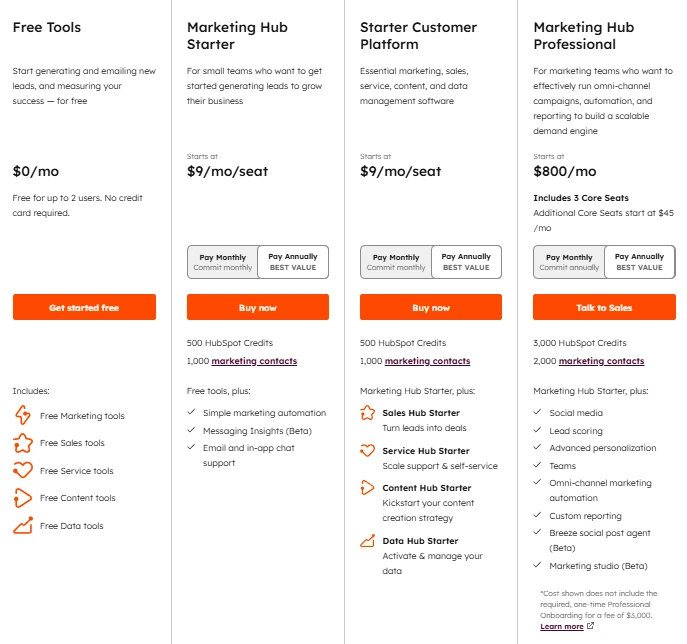
Current Pricing: Free for basic CRM features; Marketing Hub Starter $9/month per user; Starter Customer Platform $9/month per user; Professional $800/month for 3 users. Annual billing provides significant discounts. Pricing verified January 2026, subject to change.
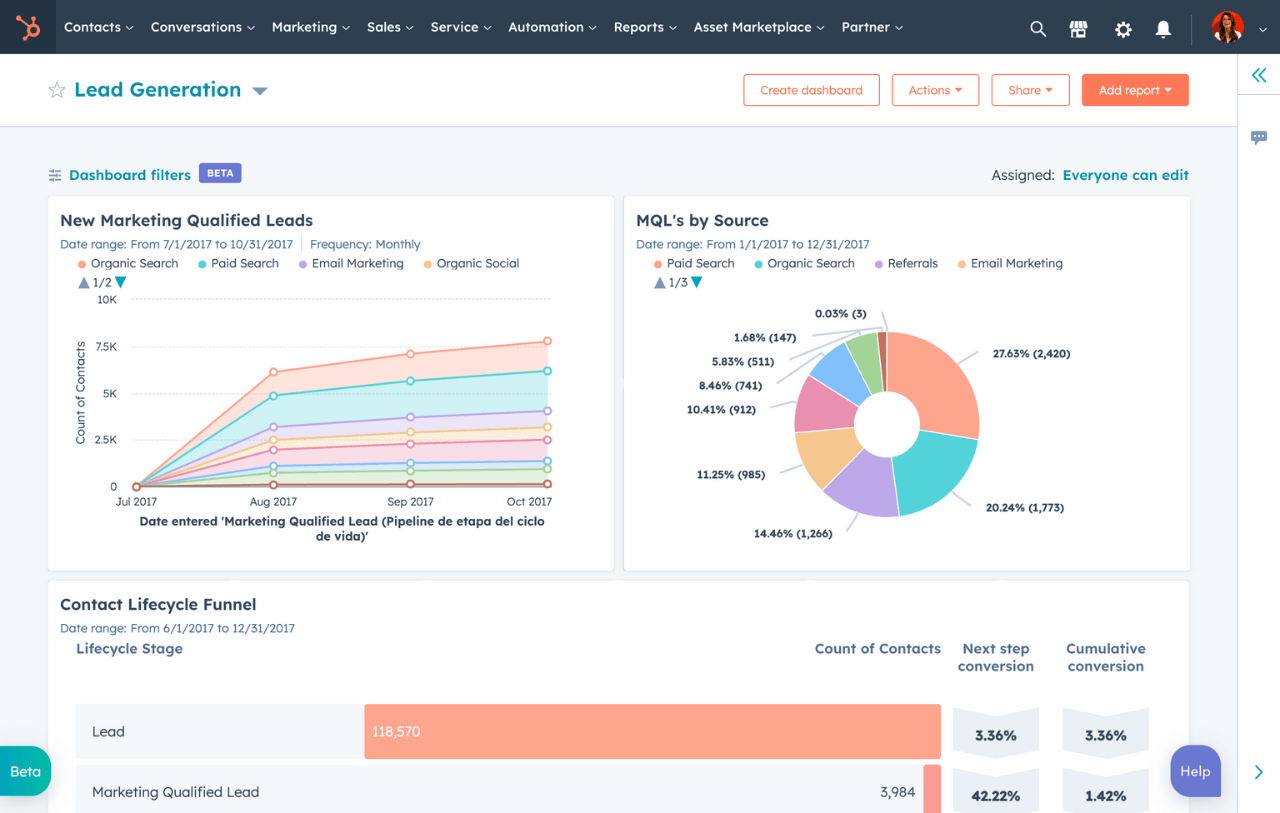
HubSpot CRM combines traditional Customer Relationship Management functionality with integrated communication tools. The platform emphasizes multichannel communication while maintaining competitive pricing for growing businesses. What sets HubSpot apart is its comprehensive approach to sales tools, offering everything from web forms for lead capture to advanced reporting and analytics in a single solution, all accessible through robust mobile app functionality.
Key Features:
- Built-In Marketing Automation: Native email campaigns, drip sequences, and automation journeys with detailed analytics, eliminating the need for separate email marketing tools
- Team Collaboration: Shared inbox functionality, internal notes, and conversation management across multiple channels including live chat, supporting comprehensive Customer Service workflows
- AI-Powered Sales Assistant: AI assistant helping with email drafting, appointment scheduling, and note-taking to increase productivity and streamline daily sales activities
- Advanced Contact Management: Extensive field customization, multiple pipeline creation, and flexible workflow automation that adapts to complex sales processes and lead management requirements
- Mobile CRM Excellence: Comprehensive mobile app for iOS and Android maintaining full functionality for field sales teams, ensuring seamless Customer Service delivery on the go
Our Take: HubSpot stands out for organizations wanting to consolidate their sales and marketing technology stack, particularly when rapid user adoption is critical. From our CRM implementation perspective, teams typically achieve productivity within 2-3 weeks rather than months. However, the pricing can escalate quickly as you add users and advanced features, making it potentially more expensive than Salesforce for larger organizations. For growing businesses that need integrated marketing capabilities and straightforward user adoption, HubSpot often delivers faster time-to-value than more complex alternatives.
For an in-depth comparison with sales-focused alternatives, read our Pipedrive vs HubSpot analysis.
.webp)
HubSpot Reviews:
- G2: 4.4/5 based on 12,000+ reviews
- Capterra: 4.5/5 based on 4,400+ reviews
- TrustRadius: 8.4/10 based on verified reviews
User feedback consistently highlights HubSpot's ease of use and comprehensive feature set. One G2 reviewer noted: "All-in-one platform eliminates tool switching." However, pricing concerns emerge in user reviews: "Costs grow quickly with team expansion."
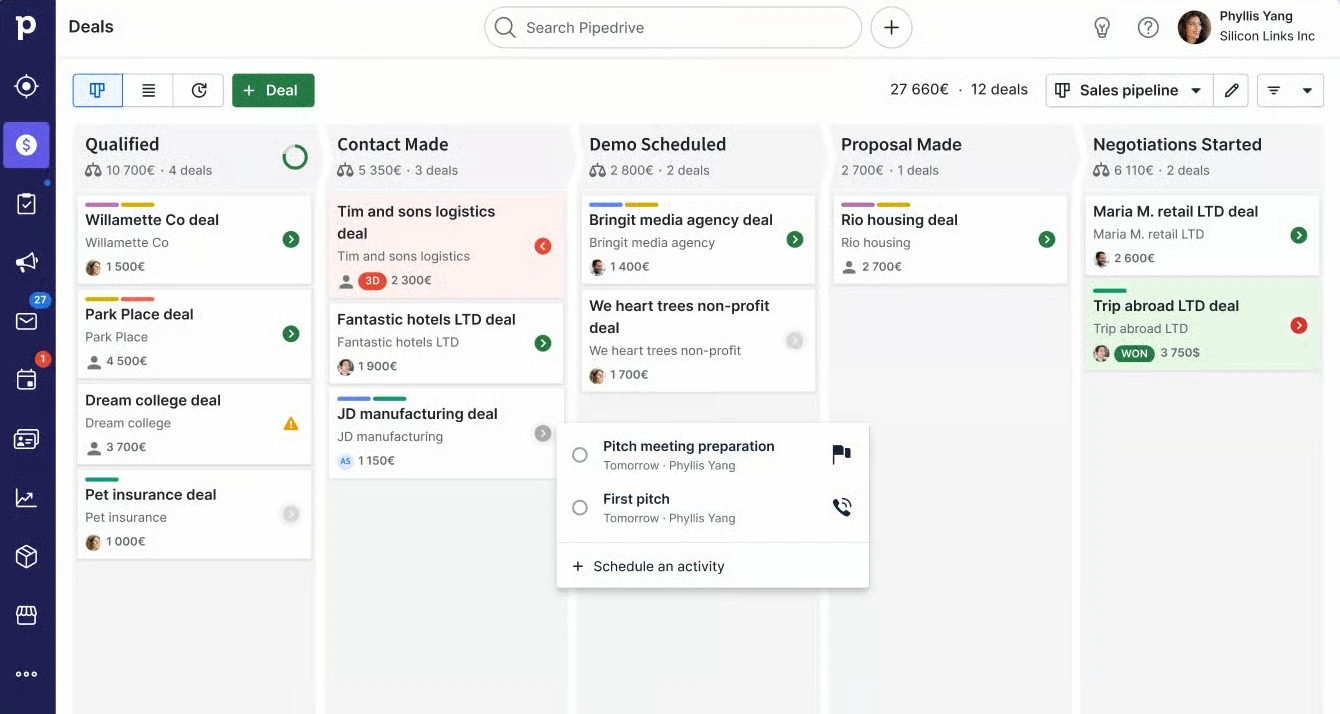
Quick Summary: Best for sales-focused teams | Immediate adoption | Limited marketing features | Competitive pricing for sales teams
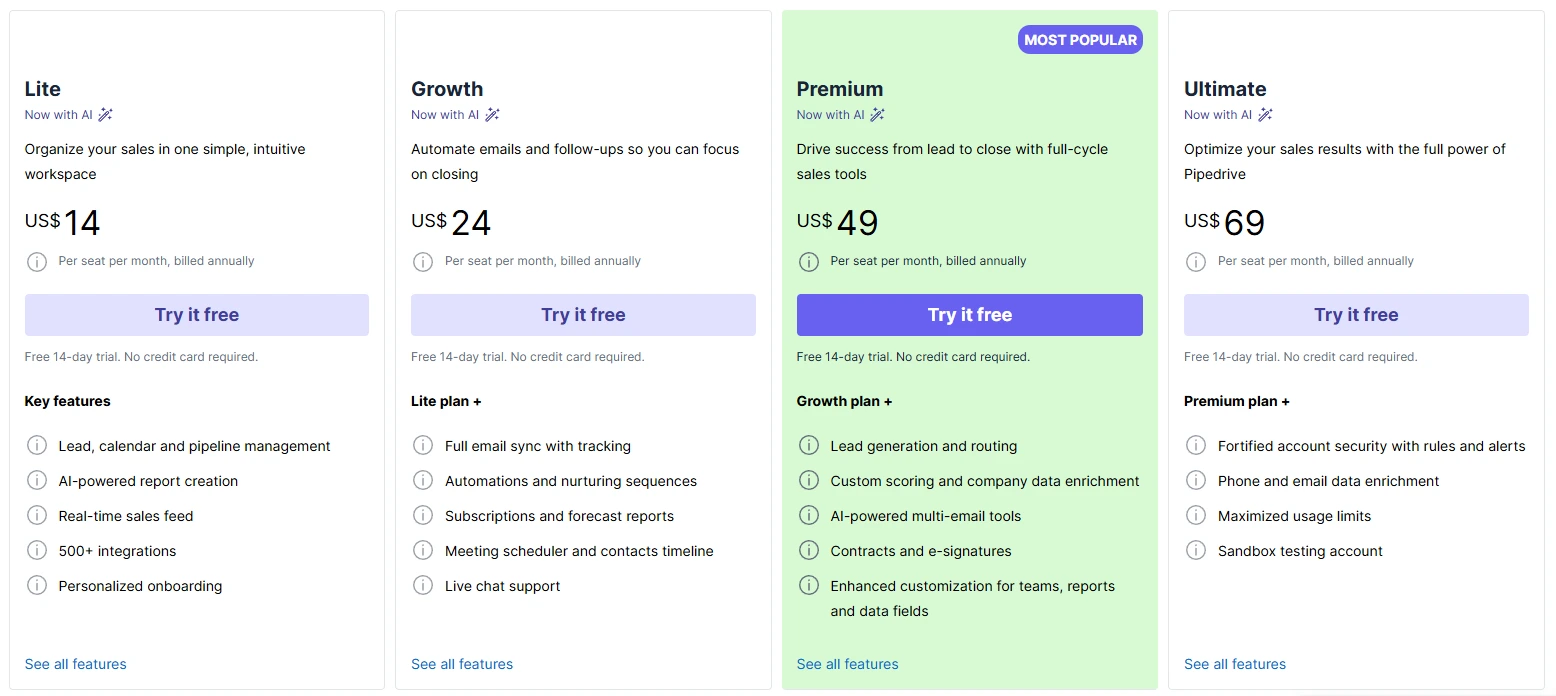
Current Pricing: Lite $14/user per month (annually) or $19/month (monthly); Growth $24/user per month (annually) or $34/month (monthly); Premium $49/user per month (annually) or $64/month (monthly); Ultimate $69/user per month (annually) or $89/month (monthly). Annual billing provides significant savings. Pricing verified January 2026, subject to change.
Pipedrive focuses specifically on sales pipeline management with an interface designed around visual deal progression. The platform prioritizes simplicity and user adoption over comprehensive feature sets, making it particularly effective for sales-driven organizations.
Key Features:
- Visual Sales Pipeline Management: Kanban-style interface provides clear visibility into deal progression, making it easy to identify bottlenecks and forecast view analysis across your entire sales cycle
- Activity-Based Selling: The platform emphasizes task management and automated follow-ups, ensuring no opportunities fall through the cracks while supporting consistent customer interactions and basic Customer Service workflows
- Workflow Automation: Sales automation helps streamline repetitive tasks like email campaigns, deal updates, and activity assignments, though advanced automation rules require higher-tier plans
- Email Integration: Two-way email synchronization with major providers, plus email tracking and the ability to send tracked emails directly from the platform using customizable email templates
- Mobile CRM Accessibility: Comprehensive mobile app for iOS and Android that maintains full functionality for field sales teams, supporting sales activities and Customer Service interactions on the go
Our Take: Pipedrive delivers exceptional value for sales-focused organizations that prioritize user adoption and pipeline visibility over comprehensive customer relationship management features. From our implementation experience, teams typically see immediate adoption because the learning curve is minimal compared to enterprise platforms. However, organizations needing extensive marketing automation, Customer Service integration, or complex workflow automation will likely outgrow the platform quickly. For businesses where sales pipeline management is the primary CRM requirement, Pipedrive often provides better user engagement and faster results than more feature-heavy alternatives.
For a detailed comparison with another user-friendly alternative, see our Pipedrive vs Salesmate analysis.

Pipedrive Reviews:
- G2: 4.3/5 based on 2,700+ reviews
- Capterra: 4.5/5 based on 3,000+ reviews
- TrustRadius: 8/10 based on verified reviews
User feedback consistently highlights Pipedrive's ease of use and user-friendly interface. One G2 reviewer noted: "Really love Pipedrive's UX! Extremely intuitive and easy to use." However, pricing concerns emerge in user reviews: "Only downside I can recognize is its pricing."
Quick Summary: Comprehensive customization | Growing marketplace | Unique needs require custom work | Competitive entry-level pricing
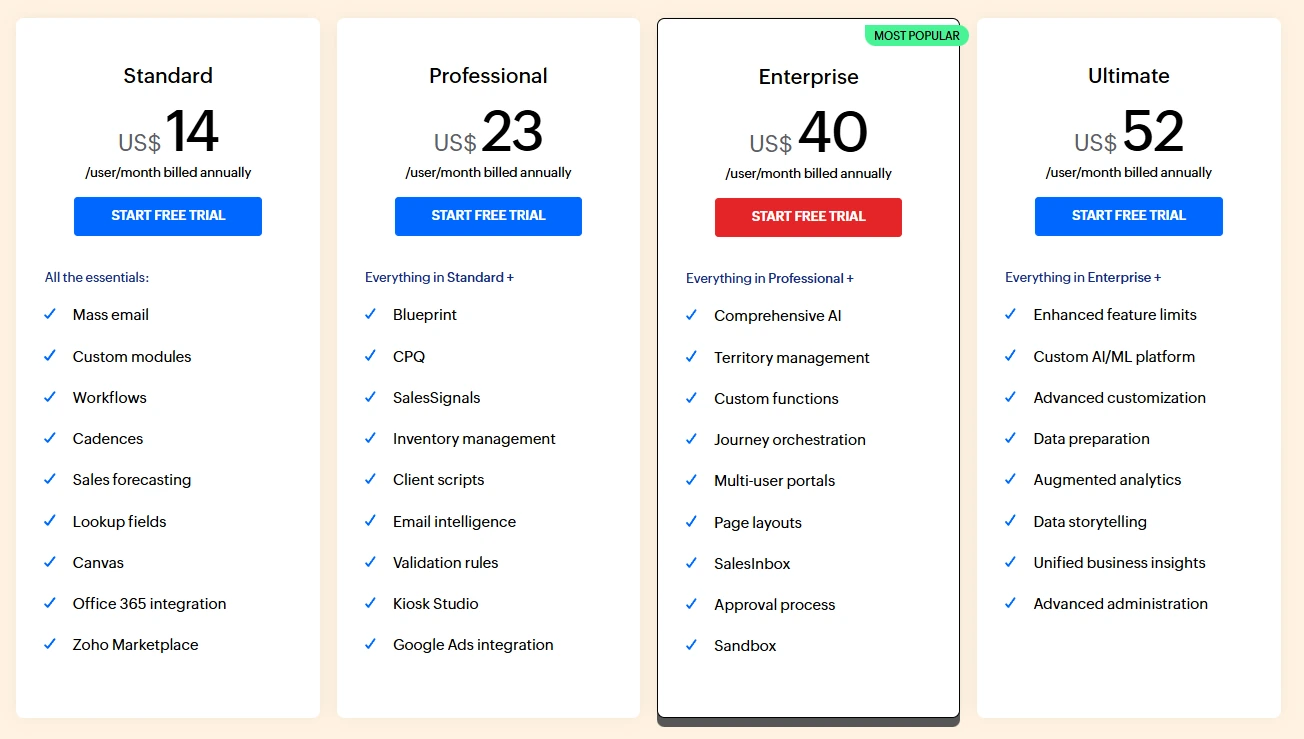
Current Pricing: Standard $14/user per month; Professional $23/user per month; Enterprise $40/user per month; Ultimate $52/user per month. Annual billing offers significant discounts. Pricing verified January 2026, subject to change.
Zoho CRM serves cost-conscious organizations needing extensive customization options within a comprehensive business application ecosystem. The platform provides enterprise-level functionality while maintaining competitive pricing for small to medium businesses.
Key Features:
- Advanced Customization: Extensive field customization, custom modules creation, and flexible workflow automation that adapts to complex business processes and industry-specific requirements
- Zoho Ecosystem Integration: Native integration with Zoho's suite of business applications, including project management, accounting, and Customer Service tools for comprehensive business operations
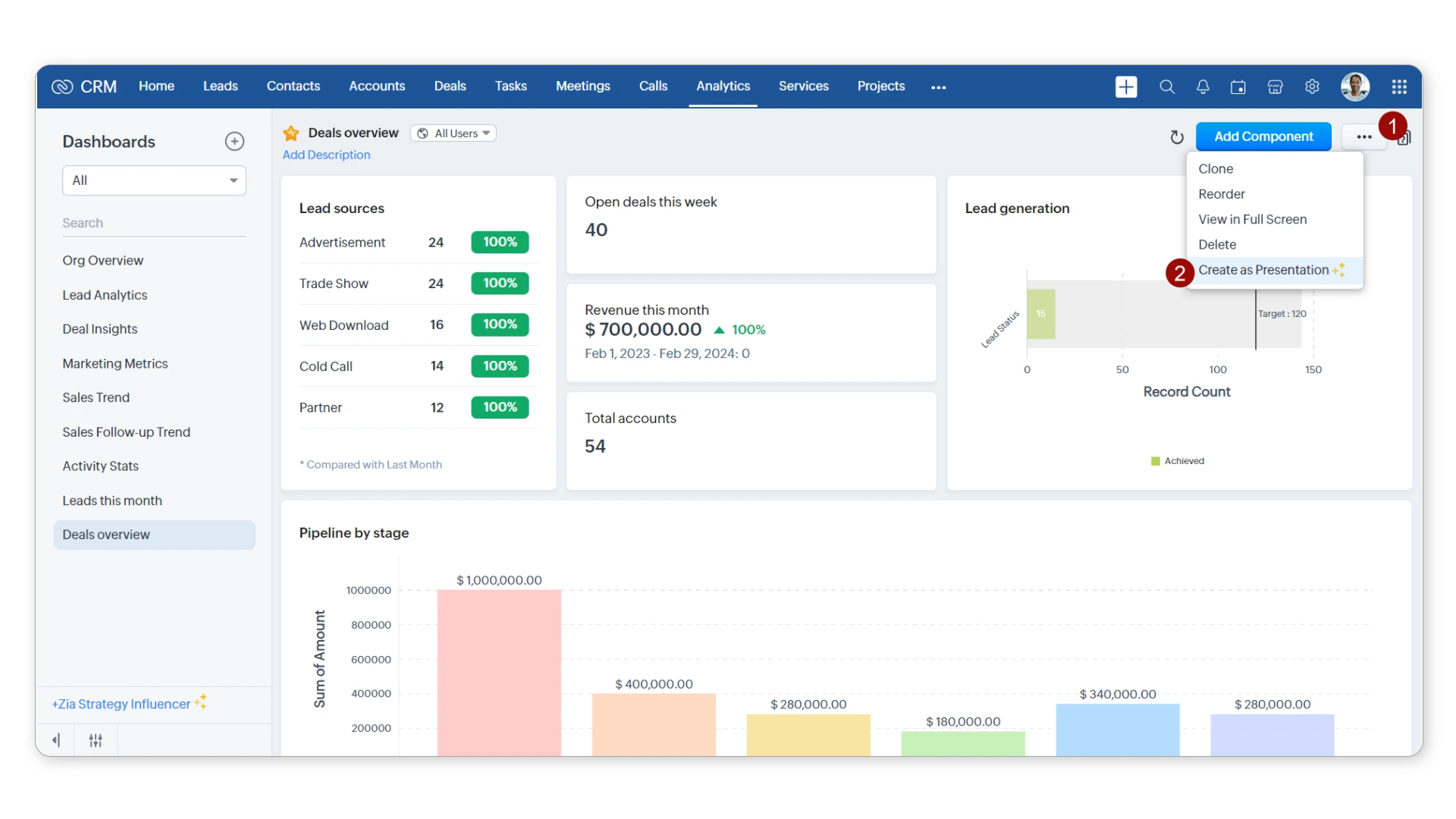
- AI-Powered Analytics: Zia AI assistant provides predictive analytics, sales forecasting, and intelligent insights to help teams focus on high-probability opportunities
- Multi-Channel Communication: Built-in telephony, social media integration, and comprehensive email marketing capabilities within a unified platform, supporting robust Customer Service workflows
- Mobile CRM Excellence: Advanced mobile app functionality with offline capabilities, ensuring field teams can access Customer Relationship Management tools and Customer Service features anywhere
- Advanced Reporting: Customizable dashboards, real-time analytics, and comprehensive reporting capabilities that provide deep insights into sales processes and customer engagement
Our Take: Zoho CRM excels for organizations that need extensive customization capabilities without enterprise-level pricing. From a CRM implementation perspective, the platform offers exceptional value when businesses can leverage multiple Zoho applications for comprehensive business operations. However, the interface can feel overwhelming for teams seeking simple pipeline management, and the extensive feature set requires more initial setup time compared to simpler alternatives. For growing companies looking to unify their business operations while maintaining cost-effectiveness, Zoho often provides superior customization options compared to more rigid platforms.
For a detailed comparison with HubSpot's marketing integration approach, see our Zoho CRM vs HubSpot analysis.

Zoho CRM Reviews:
- G2: 4.2/5 based on 2,400+ reviews
- Capterra: 4.3/5 based on 6,000+ reviews
- TrustRadius: 8.4/10 based on verified reviews
Users appreciate Zoho's customization capabilities and ecosystem integration. One G2 reviewer stated: "Powerful customization without enterprise complexity." Critical feedback often mentions: "Learning curve steeper than simpler alternatives."
Quick Summary: Enterprise automation leader | Most comprehensive features | Complex implementation requirements | Premium pricing structure
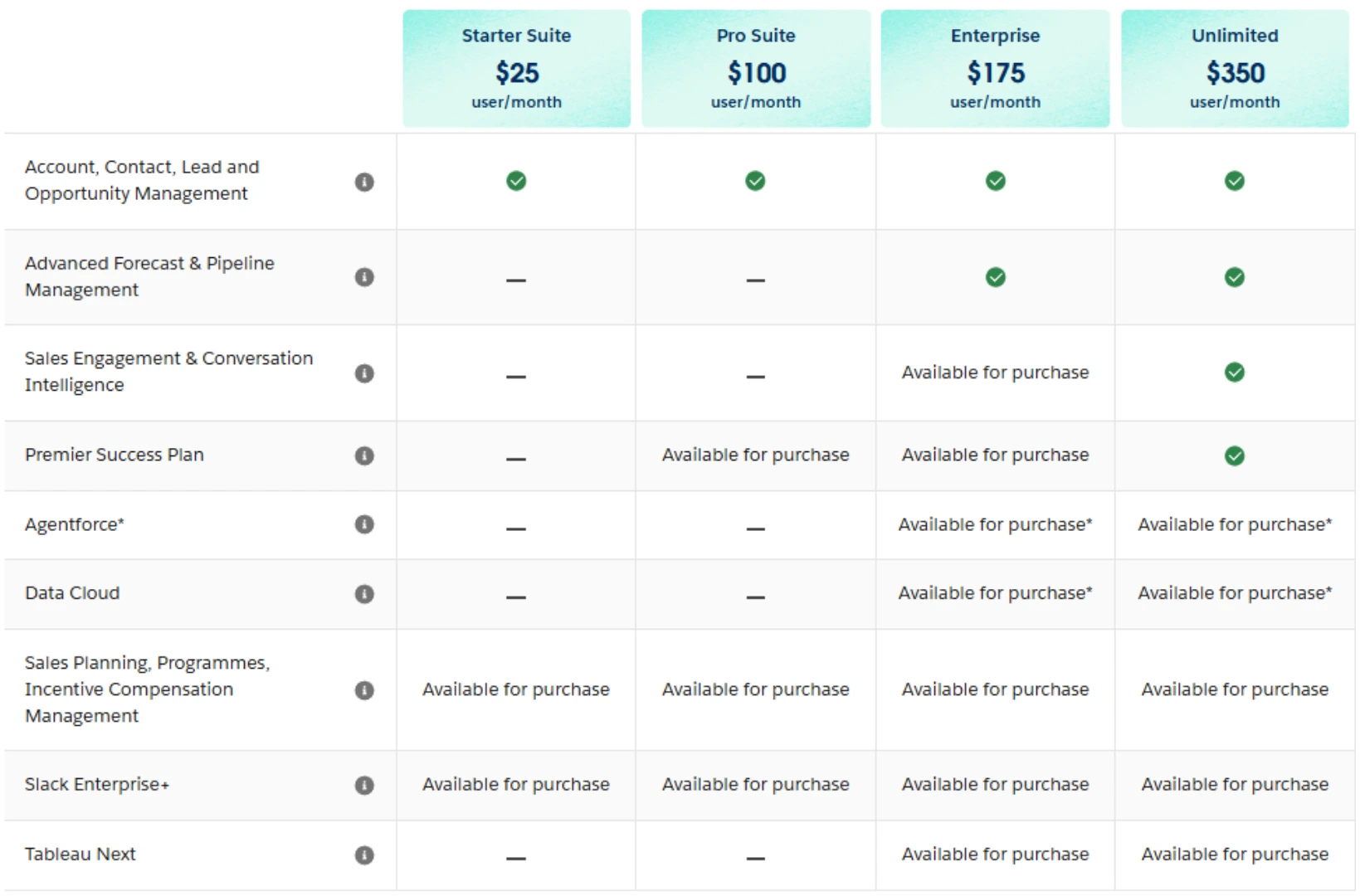
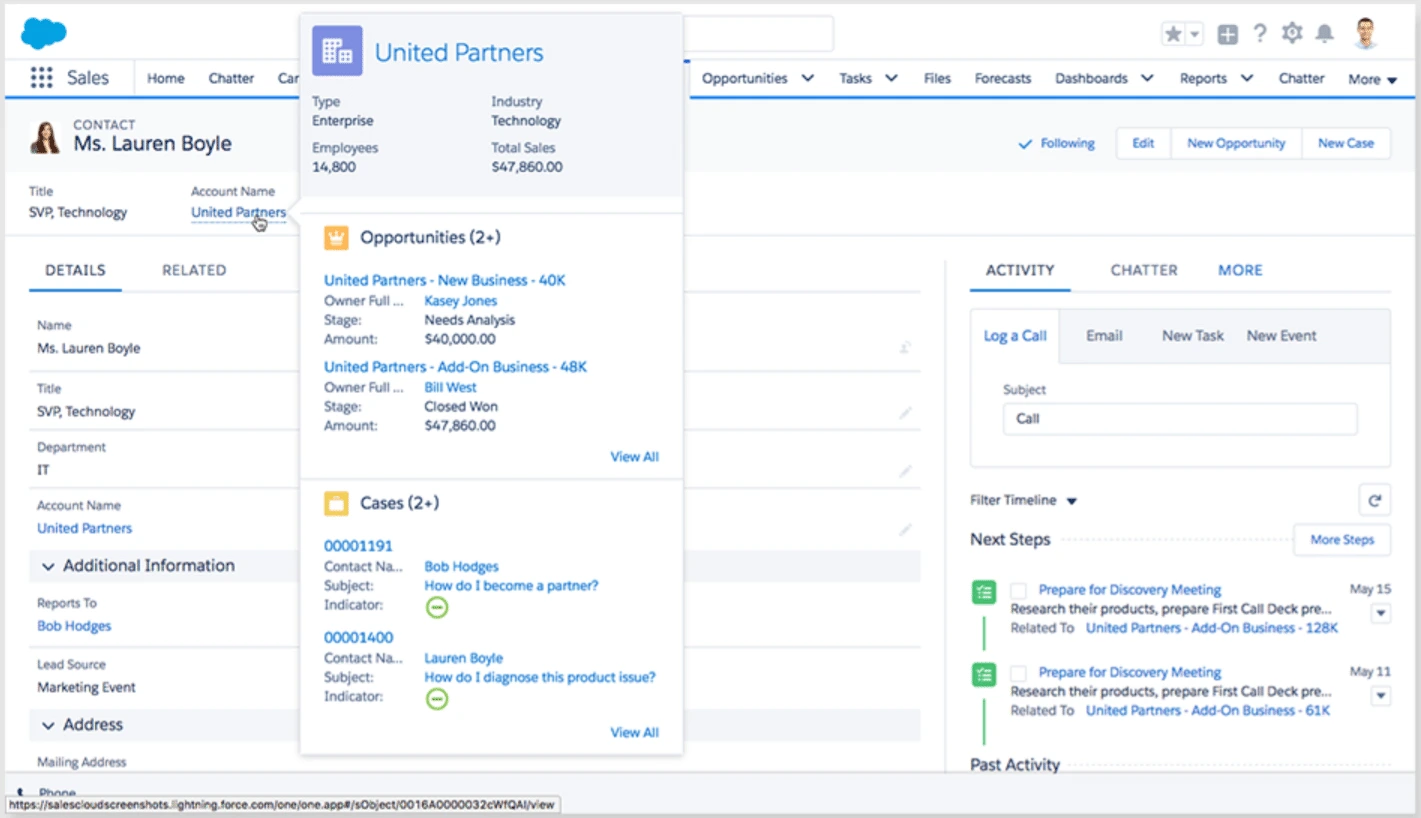
Current Pricing: Essentials $25/user per month; Professional $80/user per month; Enterprise $165/user per month; Unlimited $330/user per month. Annual billing required for most plans. Pricing verified January 2026, subject to change.
Salesforce continues to lead the enterprise CRM market with comprehensive automation capabilities and extensive customization options. The platform serves as the baseline comparison for enterprise Customer Relationship Management functionality.
Key Features:
- Advanced Automation: Comprehensive workflow automation, process builder tools, and Einstein AI capabilities that streamline complex sales processes and lead management
- Extensive App Marketplace: Thousands of third-party integrations and custom applications available through AppExchange for specialized industry needs and Customer Service enhancement
- Enterprise-Level Security: Advanced security features, compliance certifications, and data governance tools that meet enterprise security requirements
- Comprehensive Analytics: Advanced reporting, dashboards, and Einstein Analytics for deep insights into sales processes and customer engagement patterns
- Mobile CRM Leadership: Industry-leading mobile app with full offline functionality (for certain clouds, premium pricing may be required), supporting field sales teams and Customer Service representatives with complete CRM access
- Customer Service Excellence: Salesforce Service Cloud integration provides enterprise-grade Customer Service capabilities with AI-powered case management and knowledge systems
- Scalability: Platform supports massive user bases and complex organizational structures with advanced territory management and role-based permissions
Our Take: Salesforce remains the gold standard for enterprise CRM implementations that require advanced automation and extensive customization. From our implementation experience with enterprise systems, the platform provides exceptional value when organizations can leverage existing infrastructure and dedicated admin resources. However, the complexity rivals Microsoft Dynamics 365, requiring significant implementation planning and user training. For large organizations wanting enterprise-grade Customer Service integration and predictive analytics capabilities, Salesforce often provides superior workflow automation and business intelligence capabilities compared to Microsoft alternatives.
For specialized enterprise use cases, explore our private equity CRM solutions and pharmaceutical CRM implementations.
For a comprehensive analysis of other Salesforce alternatives, see our complete Salesforce alternatives guide.

Salesforce Reviews:
- G2: 4.4/5 based on 18,000+ reviews
- Capterra: 4.5/5 based on 17,000+ reviews
- TrustRadius: 8.4/10 based on verified reviews
Users consistently praise Salesforce's comprehensive functionality and customization capabilities. One G2 reviewer noted: "Most comprehensive CRM platform available." However, complexity concerns appear frequently: "Requires dedicated admin for optimal results."
Platform migrations are risky without the right plan
Data loss, broken integrations, and team disruption are real risks. We've managed dozens of transitions and know how to avoid the pitfalls
Pipeline Management
Microsoft Dynamics 365 provides comprehensive pipeline management with integration into Microsoft's broader business application suite.
Winner: HubSpot - Excellent visual design with intuitive drag-and-drop functionality. While Pipedrive offers strong visual simplicity with its kanban-style interface, HubSpot combines ease of use with comprehensive marketing integration. Salesforce provides the most advanced pipeline customization for complex enterprise sales processes, but requires significant configuration effort. For detailed pipeline management comparisons, see our Pipedrive vs HubSpot analysis.
Sales Automation and Email Follow-up
Dynamics 365 offers solid automation through Power Automate, though setup complexity can challenge smaller teams.
Winner: Salesforce - Most advanced automation capabilities with Einstein AI and comprehensive workflow builder tools. HubSpot provides strong marketing automation integration that works well for businesses combining sales and marketing efforts. Pipedrive offers basic automation tools sufficient for straightforward sales processes.
Communication Tools
Microsoft's platform integrates naturally with Teams and Office 365 for comprehensive communication capabilities.
Winner: HubSpot - Native email marketing, built-in chat, and comprehensive communication tracking in one platform. Zoho provides comprehensive multichannel communication capabilities across their ecosystem. Pipedrive focuses on email-centric communication with excellent activity tracking.
Lead Generation and Web Forms
Dynamics 365 provides basic lead capture capabilities but requires additional marketing tools for comprehensive lead generation.
Winner: HubSpot - Built-in lead capture forms, landing page creation, and comprehensive lead nurturing capabilities. Salesforce requires additional marketing automation tools for comparable functionality. Pipedrive offers limited native lead generation tools.
Customization and Integration Options
Microsoft Dynamics 365 offers extensive customization through Power Platform but requires technical expertise for implementation.
Winner: Salesforce - Most extensive customization options with AppExchange marketplace and comprehensive API access. Zoho provides strong customization within their ecosystem at competitive pricing. HubSpot offers growing ecosystem integration with user-friendly setup processes.
User Interface and Learning Curve
Dynamics 365's interface follows Microsoft design patterns but can feel complex for simple sales tasks.
Winner: Pipedrive - Clean, simple interface designed specifically for sales pipeline management. HubSpot provides intuitive design with comprehensive functionality. Salesforce offers powerful capabilities but requires significant training for optimal usage.
Reporting and Analytics
Microsoft's platform provides strong analytics through Power BI integration and built-in reporting capabilities.
Winner: Salesforce - Most comprehensive analytics with Einstein AI insights and advanced reporting builder. Advanced visualization or harnessing data outside of Salesforce may require Tableau as an add-on. HubSpot offers excellent marketing-sales analytics integration. Zoho provides solid analytics capabilities at competitive pricing points.
Customer Service and Ticketing
Microsoft Dynamics 365 includes comprehensive Customer Service capabilities with case management, knowledge management integration, and AI-powered insights for customer support workflows.
Winner: Microsoft Dynamics 365 - Most comprehensive Customer Service module with AI-powered insights, seamless integration across business applications, and robust mobile app support for field service teams. HubSpot Service Hub offers integrated service capabilities suitable for growing businesses with solid ticketing and knowledge base features. Salesforce Service Cloud provides comparable enterprise functionality but at higher cost points. Pipedrive offers limited native Customer Service capabilities, focusing primarily on sales pipeline management.
HubSpot CRM
Pipedrive
Not sure which CRM fits your team's workflow?
Every platform has trade-offs. We help you cut through the feature comparisons and find the system that matches how your team actually sells.
Zoho CRM
Salesforce Sales Cloud
Process Documentation Importance: Before evaluating any platform change, document your current customer relationship management processes, pain points, and success metrics. Understanding what works and what doesn't helps determine whether you need a new platform or better optimization of your existing system.
User Adoption Planning: The best customer relationship management platform is the one your team actually uses consistently. Focus on user experience, training requirements, and change management rather than just feature comparisons when making platform decisions.
Total Cost of Ownership Considerations: Evaluate implementation costs, ongoing training, data migration, integration requirements, and potential productivity loss during transitions. Consider both direct costs and opportunity costs when comparing alternatives.
When businesses outgrow Microsoft Dynamics 365 or find the platform overwhelming for their needs, they often require more focused functionality than comprehensive enterprise suites can provide efficiently. The transition process requires careful planning for data migration, system integration, and workflow redesign.
Our experience with CRM transitions shows that success depends more on matching platform capabilities to actual business processes than selecting the most feature-rich solution.
Capital S Consulting specializes in CRM transitions for growing businesses:
• Platform evaluation based on your specific workflow automation needs and growth trajectory
• Data migration planning with minimal disruption to ongoing sales activities
• Integration strategy that connects your chosen platform with existing business tools effectively
Whether you're seeking better user adoption, more predictable costs, or specialized functionality, the right platform selection combined with proper implementation planning makes the difference between successful transformation and costly disruption.
Contact Capital S Consulting for expert guidance on your CRM platform transition.
This analysis reflects our assessment of leading Microsoft Dynamics 365 alternatives based on CRM implementation expertise and publicly available platform information. Individual results may vary based on specific business requirements and implementation approaches.