
Here's the real question: are you buying a CRM, or are you buying a platform? Zoho CRM is a deep, configurable sales tool with automation capabilities and pricing that makes most teams do a double-take when they see the comparison. HubSpot bundles marketing, sales, and service into one interface, and charges accordingly the moment you outgrow the free tier. One is not universally better. For most companies, though, one fits their actual situation considerably better than the other, and picking wrong costs you either serious money or capability you can't retrofit later.
- Zoho CRM is the stronger fit for sales-first teams that need workflow depth and customization without paying enterprise prices
- HubSpot suits companies that want marketing and sales data living in the same system, especially if they're consolidating a fragmented tech stack
- Implementation timeline: Zoho CRM can be live in weeks; HubSpot's Sales Hub onboards quickly, but full platform value takes longer to realize
Not sure which CRM is right for your business?
Our team has guided companies across private equity, medical devices, and professional services through this exact decision. We can help you cut through the noise.
- Best fit by buyer profile: Zoho CRM is built for sales-driven SMBs and mid-market teams that need real customization and workflow automation without blowing their software budget. HubSpot is the better call for marketing-led organizations that want campaigns, pipeline, and customer data all in one place, and are willing to pay for that convenience.
- Implementation complexity: Neither platform requires a technical team to get started. Zoho CRM's configuration depth means there's simply more to set up if you want to use it properly. HubSpot feels more guided out of the box, but the features most teams actually need sit one pricing tier above where they start.
- Total cost of ownership: Zoho CRM is cheaper at every tier in any honest side-by-side cost comparison, and it's not close. HubSpot's free CRM is genuinely useful for small teams, but once you're scaling into Sales Hub Professional or Enterprise, the per-seat math becomes a serious budget conversation.
Key Features
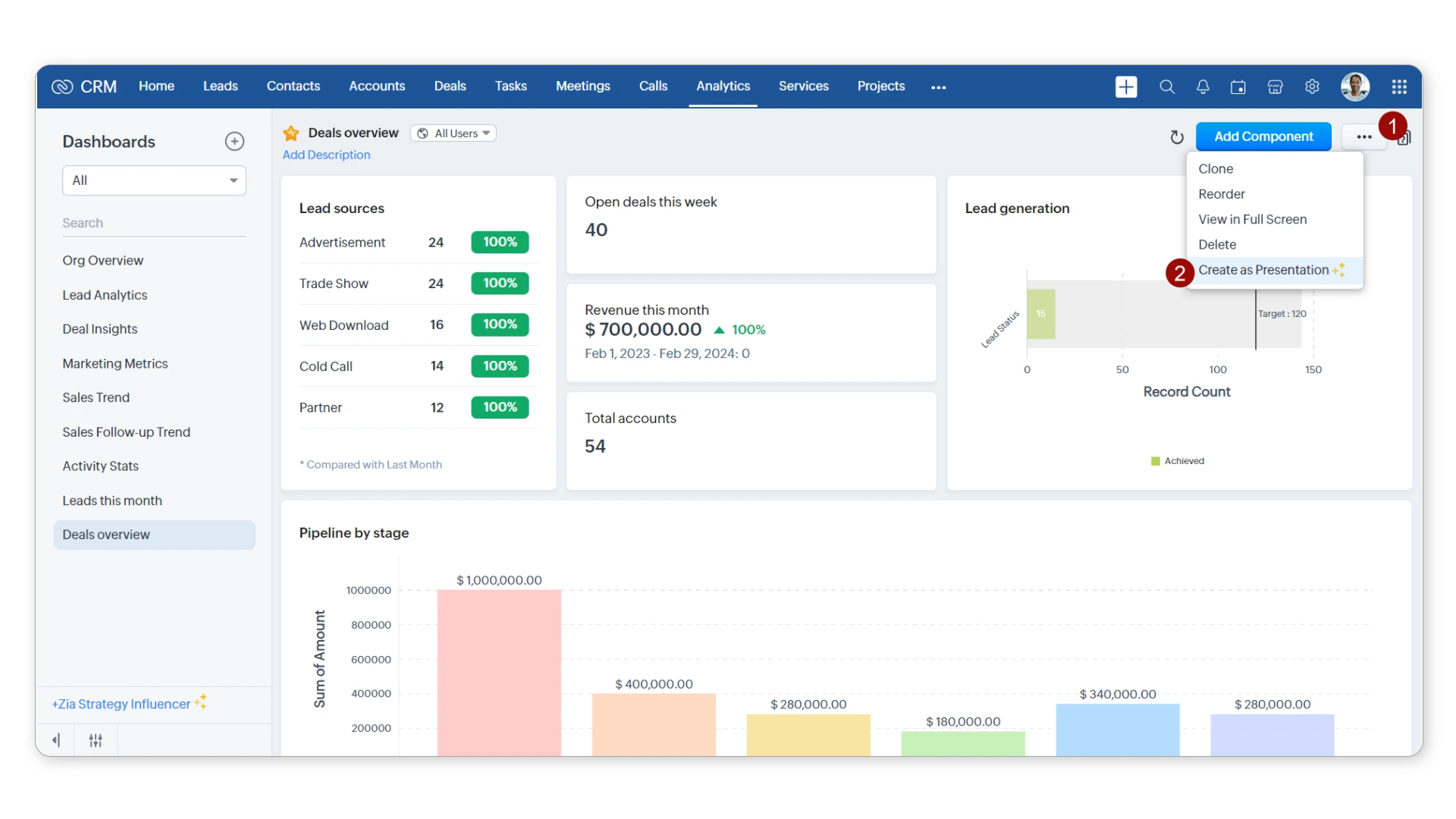
- Sales force automation: Automated lead assignment, activity tracking, and deal progression rules that take manual data entry off your reps' plates
- Workflow engine: Multi-condition automation with custom triggers across modules, more configurable than most platforms at this price point
- AI assistant (Zia): Built-in AI for lead scoring, deal predictions, email sentiment analysis, and data enrichment suggestions
- Omnichannel outreach: Email, phone, live chat, and social managed from one interface, with a solid mobile app for field sales teams
Pricing Structure
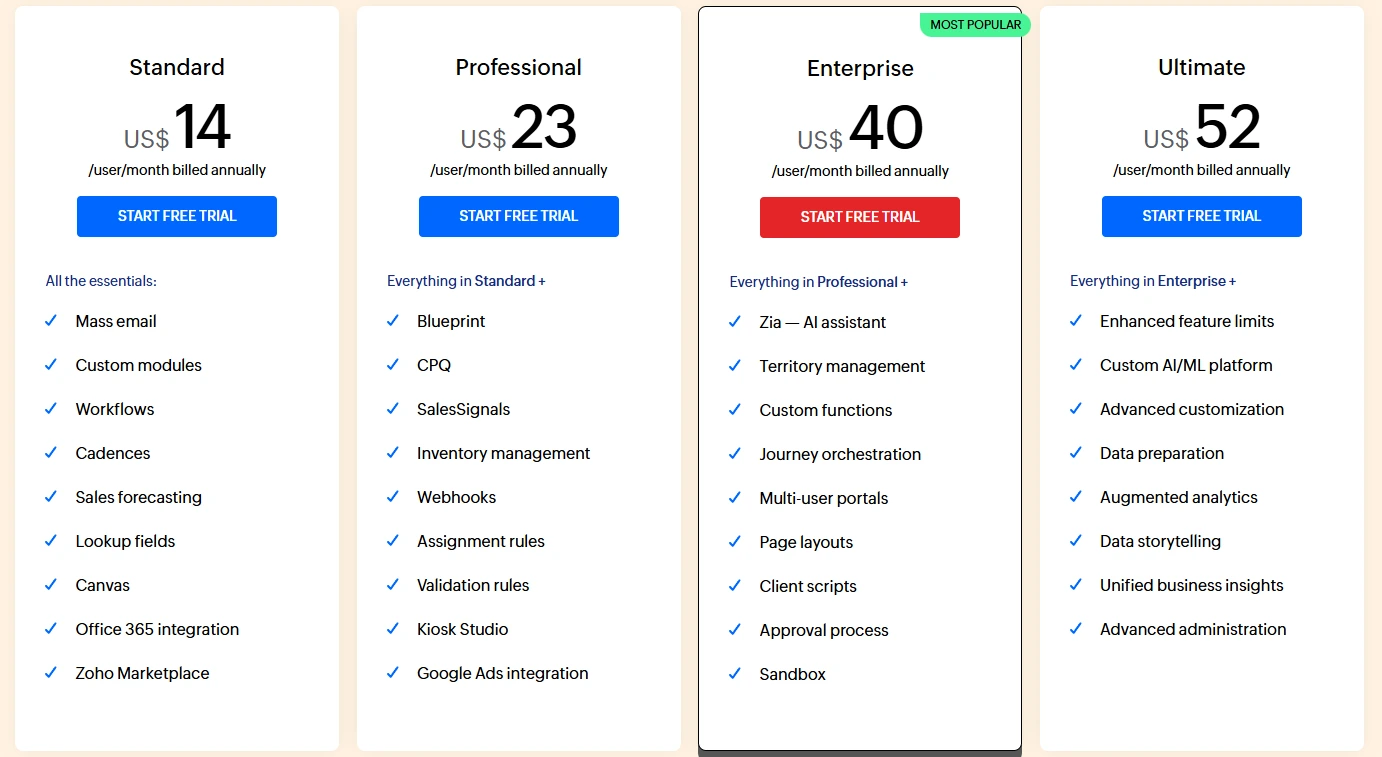
- Free: Up to 3 users
- Standard: $14/user/month
- Professional: $23/user/month
- Enterprise: $40/user/month
- Ultimate: $52/user/month
- Prices as of mid-2025; billed annually
Our Take
Zoho CRM punches well above its price class on sales automation and workflow depth. It's the right tool when your team needs to configure a serious sales process without paying for features no one will ever touch. What you'll find, though, is that the limitation surfaces fast for teams with marketing ambitions: Zoho CRM is not a marketing platform. If your team needs email campaigns, landing pages, and attribution reporting all tied to contact records, you'll need to expand into the broader Zoho suite or bring in a separate tool, those aren't optional workarounds, they're structural gaps. Teams weighing whether to stay with Zoho or move to an enterprise platform should also read our Zoho CRM vs Salesforce comparison.
Key Features
- Sales Hub: Pipeline management, email sequences, meeting scheduling, and deal tracking, with an interface most reps get comfortable with fast
- Marketing integration: Email marketing, forms, landing pages, and lead scoring all native to the platform, so campaign data connects directly to sales records without any integration work
- Breeze Copilot: HubSpot's AI layer for content generation, prospecting, data enrichment, and workflow suggestions, woven throughout the platform
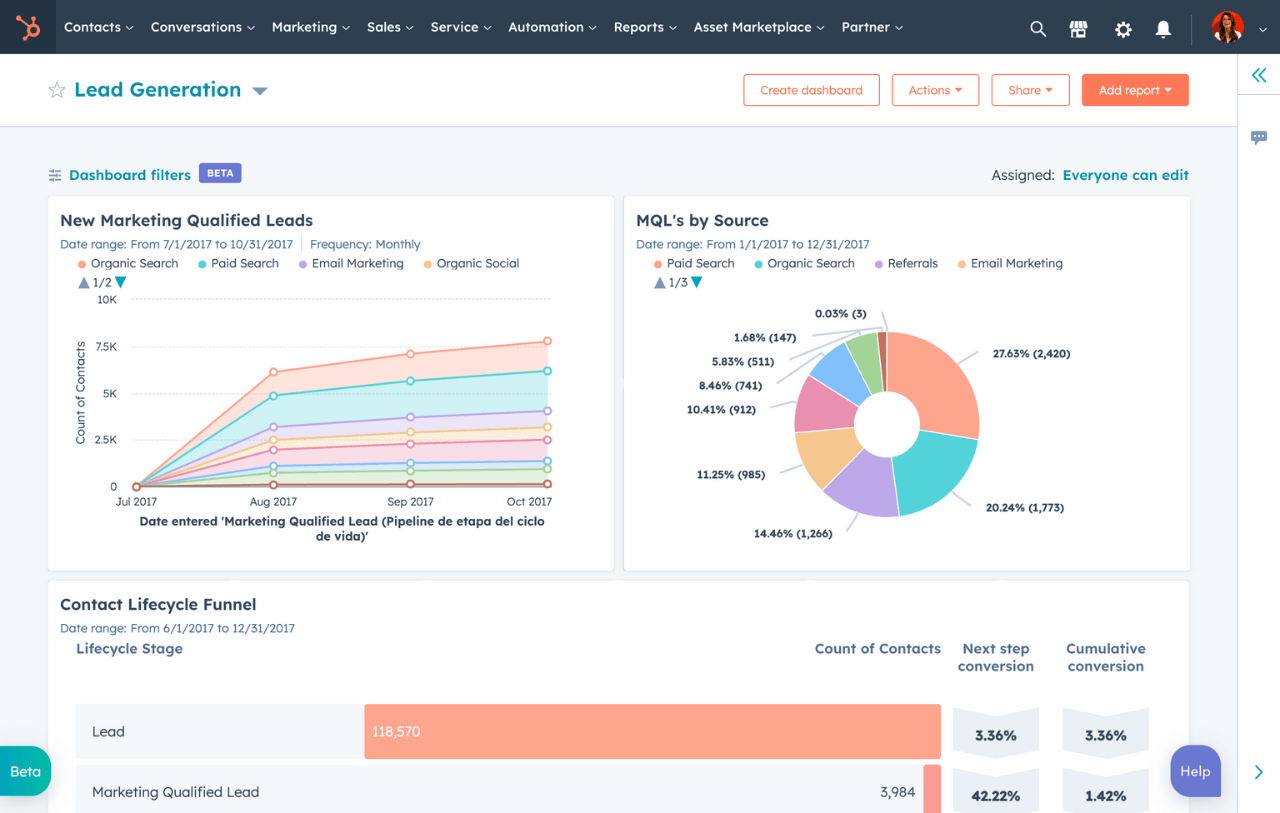
- Reporting and analytics: Pre-built and custom dashboards with revenue attribution across marketing and sales touchpoints
Pricing Structure
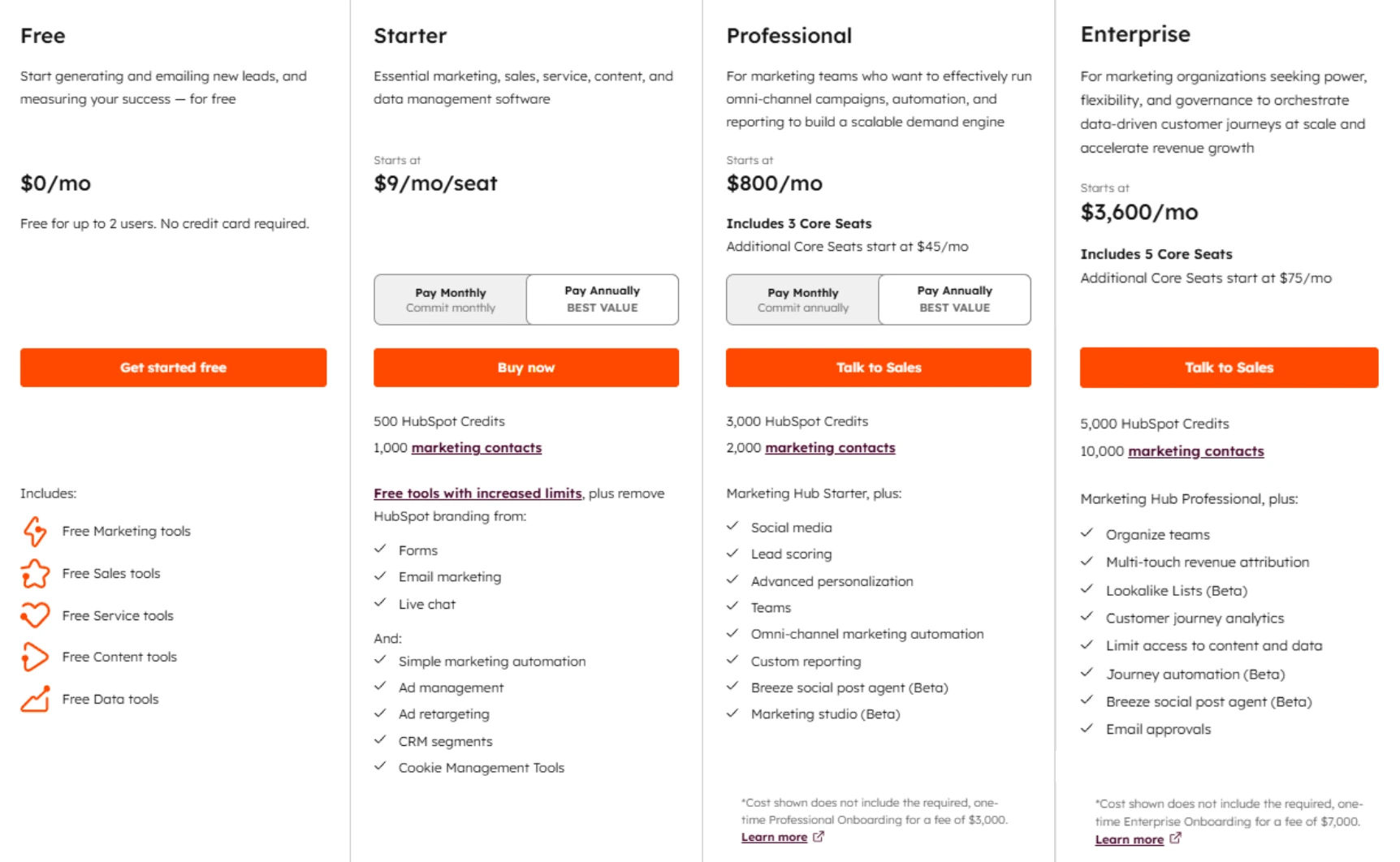
- Free CRM: Unlimited users, core features
- Sales Hub Starter: $15/user/month
- Sales Hub Professional: $90/user/month
- Sales Hub Enterprise: $150/user/month
- Prices as of mid-2025; billed annually. Full platform bundles priced separately.
Our Take
HubSpot's real value only shows up when sales and marketing teams are actually using it together, on paper and in practice. The free tier is legitimately useful for small teams finding their footing. Here's what trips people up: the jump to Professional, where the automation and analytics features that justify the platform actually live, hits $90 per user per month. For a team running purely on CRM and sales tooling, that per-seat cost at scale is hard to defend against Zoho CRM or Salesforce alternatives. Pay for the whole platform only if you're actually going to use the whole platform.
Sales Force Automation and Pipeline Management
Zoho CRM's automation engine is its clearest differentiator. Multi-condition workflows, custom scoring rules, and blueprint-based sales processes give teams real control over how leads move through the pipeline, at the Professional tier for $23 per user per month. HubSpot's pipeline management is more approachable: drag-and-drop deal stages, clean activity timelines, an interface reps actually open without being asked. Here's what trips people up: automation depth at the Starter tier is genuinely limited. Sequences and basic task automation are available, but anything with branching logic requires a jump to Professional at $90 per user per month, and that's not a minor gap.
Winner: Zoho CRM, more sales force automation capability per dollar, especially for teams running defined multi-stage processes.
Email Marketing and Lead Management
HubSpot wins this one without much debate. Email marketing is native, attribution connects campaign sends directly to pipeline outcomes, and lead scoring pulls from both marketing and sales activity simultaneously. Zoho CRM handles email integration and basic lead management well enough, but serious email marketing means adding Zoho Campaigns, a separate product with a separate configuration overhead. Most teams don't realize how much that friction compounds until they're manually reconciling campaign data with sales records every month. For organizations where marketing and sales run on the same platform, HubSpot eliminates that problem entirely; for sales-only teams, the premium is hard to justify.
Winner: HubSpot, native email marketing with direct CRM attribution is a meaningful operational advantage for marketing-led teams.
Customization and Workflow Depth
Zoho CRM supports custom modules, custom fields at every level, multi-record relationships, and workflow automation that triggers across any module combination. For industries or sales processes that don't fit the standard contact-account-deal model, that flexibility is decisive. HubSpot's customization has improved, but it still centers on the standard marketing-to-sales funnel, deep object customization remains more constrained than Zoho CRM or Salesforce, and that ceiling shows up faster than most buyers expect. If your process is standard, HubSpot's constraints won't matter. If your process isn't, they will.
Winner: Zoho CRM, for teams with non-standard data models or complex process requirements, Zoho's configurability is meaningfully deeper. For teams that want strong pipeline management without that configuration overhead, our Zoho CRM vs Pipedrive comparison covers a more pipeline-focused alternative.
Most CRM projects fail not because of the platform. Because of the plan.
Poor scoping, skipped user training, and rushed data migration are behind most CRM failures, not the software itself. Capital S helps you avoid those mistakes before they happen.
Reporting, Analytics, and Intelligence
Out of the box, HubSpot wins. Dashboards arrive pre-configured with revenue attribution across marketing and sales touchpoints, genuinely valuable when leadership wants to understand where pipeline is actually coming from, not just how much of it exists. Zoho CRM's analytics are detailed, but reaching the same level of insight requires more deliberate setup work. One caveat worth knowing before you write Zoho off: the Ultimate tier includes advanced analytics through Zoho Analytics that can rival dedicated BI tools, and at $52 per user per month, that's still cheaper than HubSpot Professional. The capability is real, it's just locked behind the highest pricing tier, and most teams never configure their way there.
Winner: HubSpot, out-of-the-box analytics and attribution reporting are cleaner and faster to actionable insight for most teams.
Pricing and Total Cost of Ownership
The hubspot vs zoho crm pricing gap widens considerably as teams scale. A 20-person sales team on Zoho CRM Professional pays roughly $460 per month. The same team on HubSpot Sales Hub Professional pays $1,800 per month, $16,080 per year in difference. That conversation gets harder when your team only uses the CRM and sales features, not the marketing tools that are supposed to justify HubSpot's pricing model. We see this miscalculation regularly: teams buy HubSpot for the integration promise and end up using 40% of what they're paying for. If your org genuinely runs marketing and sales off the same platform, that number looks different. If it doesn't, it's an expensive lesson.
Winner: Zoho CRM, the cost advantage is significant at mid-market scale, particularly for sales-only use cases. If HubSpot's pricing model doesn't fit your budget, our guide to the best HubSpot alternatives covers the strongest options at lower price points.
Zoho CRM Platform Ratings

- G2: 4.1/5 based on 2,700+ reviews
- Capterra: 4.3/5 based on 6,800+ reviews
- What users praise: Customization depth, value for money, and the breadth of the Zoho ecosystem for teams that expand into other products
- Common criticism: The interface can feel cluttered, and the learning curve steepens quickly once you move into advanced configuration
- Bottom line: High user satisfaction for the price, most complaints come from teams that underestimated the setup involved, not from the platform falling short on capability
HubSpot Platform Ratings

- G2: 4.4/5 based on 12,000+ reviews
- Capterra: 4.5/5 based on 4,100+ reviews
- What users praise: Ease of use, clean interface, strong onboarding resources, and a free CRM that's actually useful for small teams
- Common criticism: Pricing escalates steeply at the Professional tier, and teams that go all-in on HubSpot often feel the lock-in once they're fully embedded
- Bottom line: Among the highest-rated CRM platforms by review volume, dissatisfaction concentrates almost entirely around cost at scale, not product quality
Zoho CRM Pros and Cons
HubSpot Pros and Cons
Zoho CRM vs HubSpot: Total Cost of Ownership Goes Beyond the License Fee
The hubspot vs zoho crm sticker price comparison looks simple on a spreadsheet. The real number is messier, and most teams discover this six months after go-live. Factor in implementation time, data migration from your current system, training hours, and the integrations required to connect your CRM to everything else your team runs on. HubSpot's lower barrier to entry masks higher downstream costs, especially when data gets migrated carelessly or a pipeline gets half-configured on day one and rebuilt from scratch three months later. Zoho's lower per-seat cost, on the other hand, doesn't account for the hours spent configuring workflows that HubSpot delivers out of the box, and those hours have a real dollar value. Neither platform is actually cheap once you add up what it takes to run it well.
User Adoption Is Where Most CRM Projects Fail
Full stop. The best-configured CRM in the world fails if your sales team routes around it. Before settling the zoho crm vs hubspot decision, get your actual reps involved in the evaluation, have them spend thirty minutes in each interface doing real tasks, not watching a demo. The platform your team will use consistently beats the platform with the better feature list, every single time. What you'll find: HubSpot wins on initial rep adoption almost universally, while Zoho CRM wins on long-term flexibility as process complexity grows. Neither outcome is guaranteed, both depend heavily on how much change management you invest before go-live, not after.
The real question underneath every zoho crm vs hubspot conversation we have with clients is almost always about growth trajectory. Where are you in 24 months, and does your CRM need to get you there or grow with you? If your primary need is a configurable sales process with real workflow depth and budget is a genuine constraint, Zoho CRM deserves serious consideration, not as a compromise, but as a deliberate choice. If you're building a revenue operation where marketing and sales need to share attribution data and you're prepared to pay for that integration benefit, HubSpot makes it easier than anything else at this price point. Those are genuinely different answers for genuinely different businesses.
Across hundreds of hubspot vs zoho crm implementations, one pattern holds without exception: the platform decision matters less than the implementation quality. A well-configured Zoho CRM with clean data, trained users, and integrated reporting will outperform a poorly implemented HubSpot deployment every time. Full stop. The companies that get the most from either system invest in getting the foundation right, they don't just pick the "better" platform and assume the rest follows. If you're working through this decision and want a direct conversation about which fits your actual situation, that's exactly the kind of guidance we provide. Capital S has been implementing and optimizing CRM systems since 2018, across industries from CRM for medical devices to CRM for private equity, and we'll tell you honestly if neither platform is the right call. Our Salesforce implementation and Salesforce managed services practices exist precisely for companies that have outgrown what Zoho and HubSpot can offer. Reach out to start that conversation.
We've implemented Salesforce across private equity, medtech, pharma, and more.
Our implementations go beyond licensing. We scope, configure, integrate, and train, so your team actually uses what we build.
Ready to find the right CRM for your team?
Whether you've already decided on Salesforce or are still weighing options, our team can help you scope the right implementation, or just answer your questions.
