
Quick Comparison Summary
Salesforce wins for enterprises that need comprehensive marketing automation, advanced customization, and all-in-one capabilities at scale. Pipedrive wins for sales teams prioritizing intuitive pipeline management, rapid user adoption, and cost-effective sales automation without complexity.
Still unsure which platform fits your specific needs? Read our detailed comparison below or contact Capital S Consulting for expert CRM selection guidance.
Who each platform fits: Pipedrive serves sales-focused teams in SMBs needing streamlined deal management; Salesforce serves enterprises requiring integrated sales, marketing, and service operations
Time-to-value insights: Pipedrive typically achieves user adoption within days; Salesforce comprehensive features require weeks to months for full implementation
TCO considerations: Pipedrive transparent pricing can increase with add-ons; Salesforce enterprise features require significant investment in higher-tier plans and customization
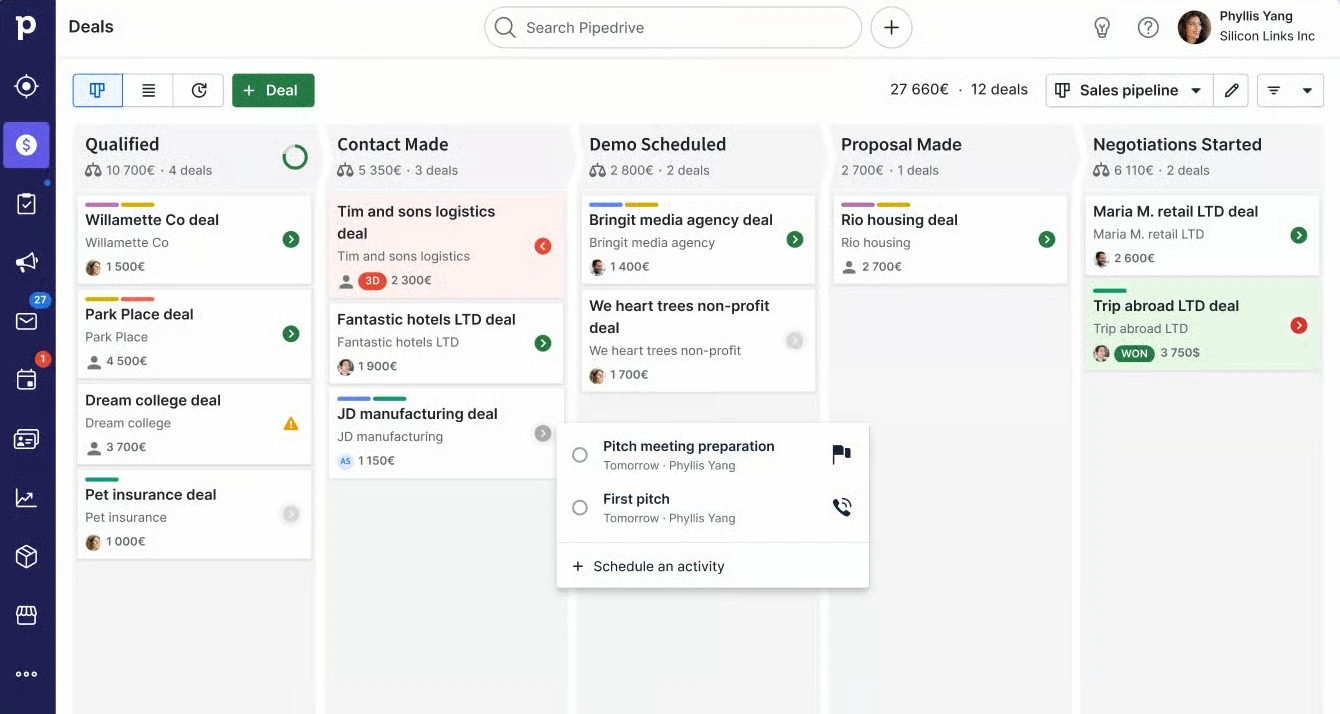
Pipedrive has earned recognition as a sales-focused CRM that prioritizes ease of use without sacrificing functionality. The platform's visual sales pipeline serves as its cornerstone feature, allowing teams to track deals through customizable stages with drag-and-drop simplicity. This approach makes it particularly effective for teams transitioning from spreadsheets or those seeking to improve their sales mindset through organized lead capture and systematic automated follow-ups.
Key Features
Visual Sales Pipeline Management: Pipedrive's kanban-style interface provides clear visibility into deal progression, making it easy to identify bottlenecks and forecast view analysis across your entire sales cycle.
Activity-Based Selling: The platform emphasizes task management and automated follow-ups, ensuring no opportunities fall through the cracks while supporting consistent customer interactions.
Workflow Automation: Sales automation helps streamline repetitive tasks like email campaigns, deal updates, and activity assignments, though advanced automation rules require higher-tier plans.
Email Integration: Two-way email synchronization with major providers, plus email tracking and the ability to send tracked emails directly from the platform using customizable email templates.
Mobile Accessibility: Comprehensive mobile apps for iOS and Android that maintain full functionality for field sales teams, supporting sales activities on the go.
Quick Summary Box
Sales-focused simplicity | Basic integrations included | Advanced connections need development | Competitive pricing for sales teams
Pricing Structure
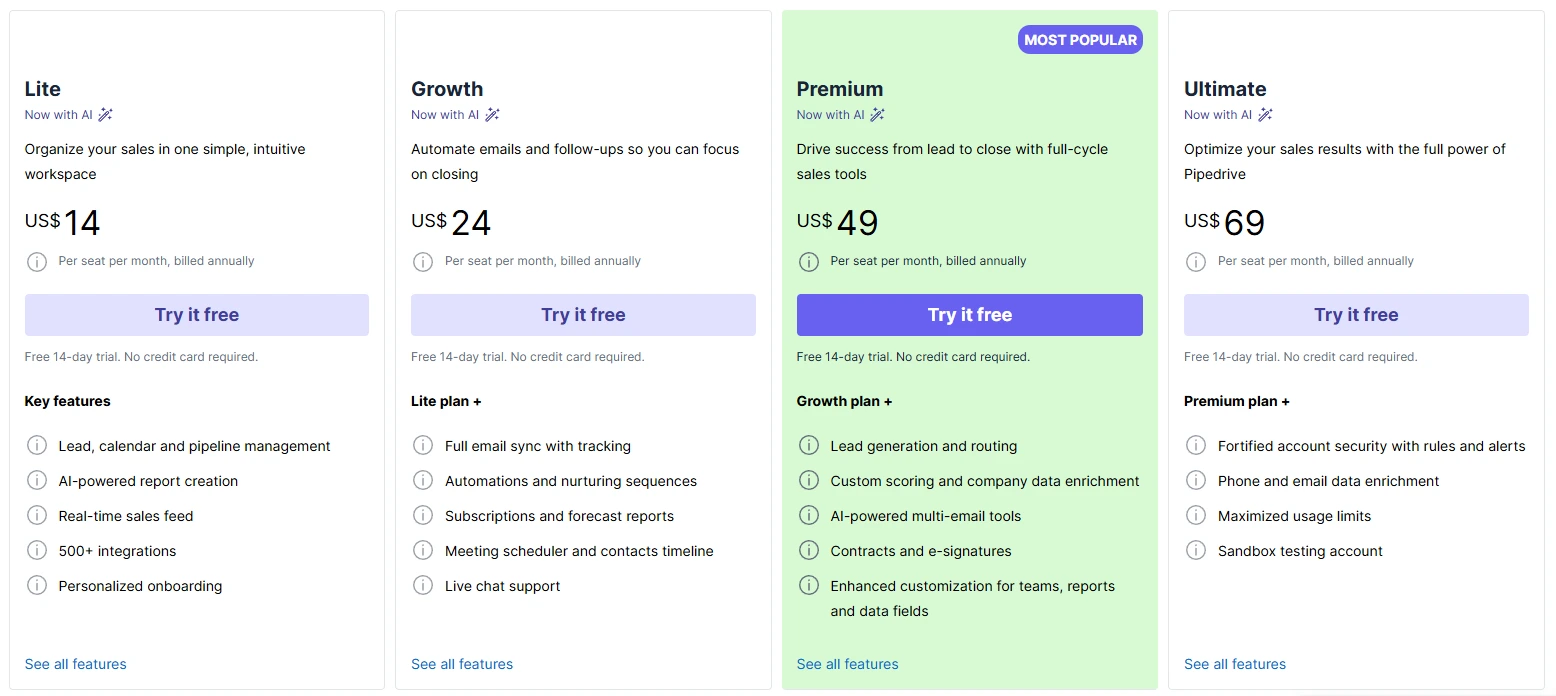
Pipedrive offers four main pricing tiers, with annual billing providing significant savings:
- Lite: $14/user/month (annually) or $24/month (monthly)
- Growth: $24/user/month (annually) or $49/month (monthly)
- Premium: $49/user/month (annually) or $79/month (monthly)
- Ultimate: $69/user/month (annually) or $99/month (monthly)
Pricing verified December 2025, subject to change.
Our Take on Pipedrive
Pipedrive stands out for its intuitive interface and focus on visual sales pipeline management, particularly when teams need to get up and running quickly without extensive training. From a CRM implementation perspective, we've found that sales professionals can typically master Pipedrive's core functions within hours rather than weeks, making it excellent for organizations prioritizing rapid user adoption without extensive customization or integration needs. However, advanced customization capabilities are limited compared to more flexible platforms, and key features like comprehensive workflow automation require higher-tier plans. For organizations looking to establish straightforward sales processes with minimal administrative overhead, this platform delivers excellent user adoption rates and helps teams track and close deals more effectively.
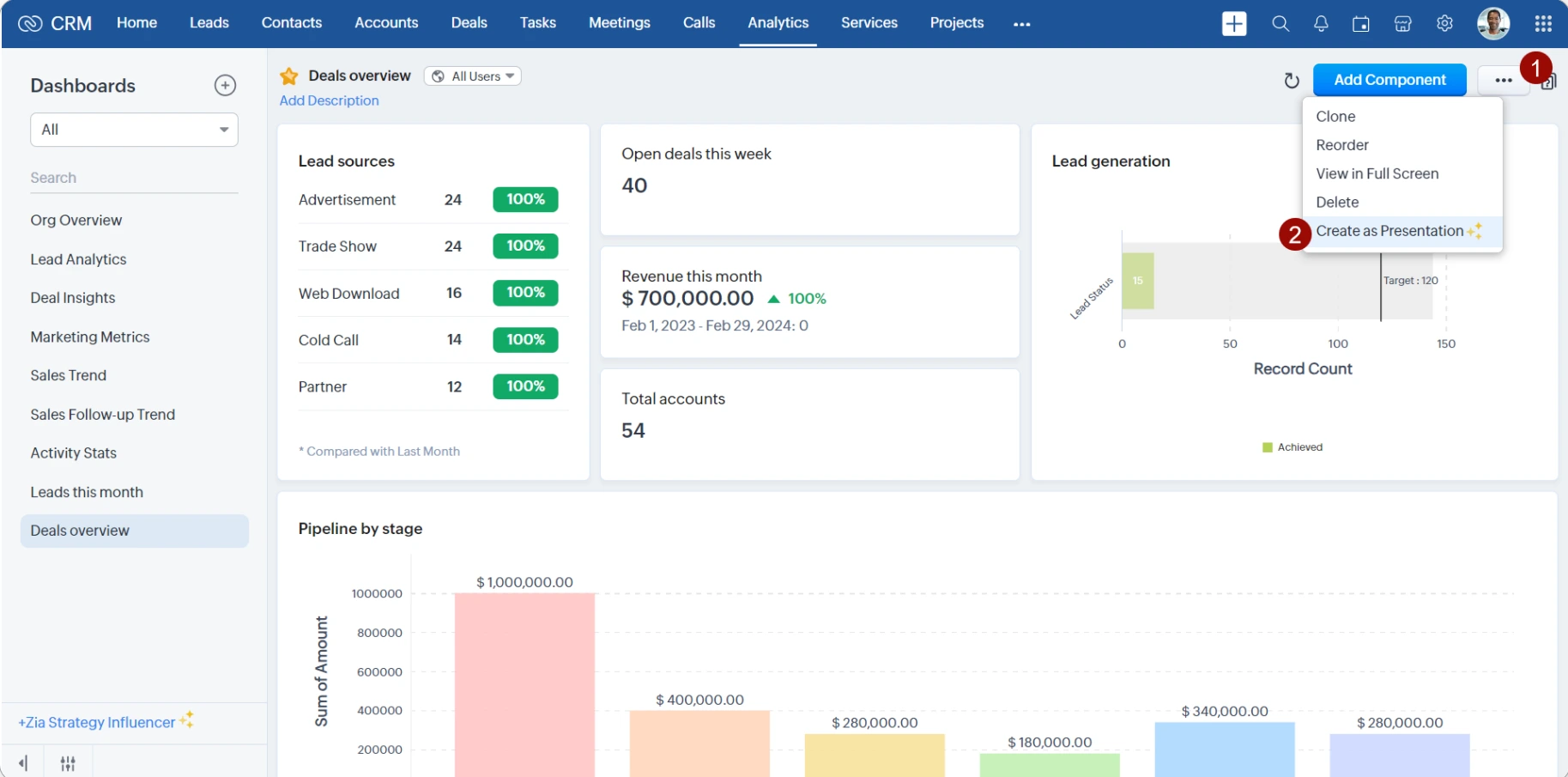
Salesforce positions itself as a unified platform that combines traditional CRM functionality with integrated communication tools. The platform emphasizes multichannel communication while maintaining competitive pricing for growing businesses. What sets Salesforce apart is its comprehensive approach to sales tools, offering everything from web forms for lead capture to advanced reporting and analytics in a single solution. That said, there are several tiers of the platform with limited features - access to all features can be cost-prohibitive to some users.
Key Features
Sales Cloud: Comprehensive sales automation with advanced pipeline management, deal insights, conversation intelligence, and custom app development capabilities through Lightning App Builder.
Einstein AI: AI-powered insights including Einstein Analytics for predictive analytics, Einstein AI features for lead scoring, and AI-powered lead scoring to improve sales efficiency.
Marketing Cloud: Native email campaigns, marketing automation with drip sequences, and comprehensive customer journey orchestration across multiple channels.
Service Cloud: Complete customer service management across email, chat, phone, and social media channels with AI-powered automation capabilities.
AppExchange Marketplace: Access to thousands of third-party integrations and custom applications for unlimited flexibility in extending platform capabilities.
Lightning Experience: Modern interface with Flow Builder for workflow automation and customizable dashboards for real-time analytics.
Quick Summary Box
Enterprise-scale powerhouse | Extensive pre-built connections | Complex customization available | Higher cost as you scale
Pricing Structure
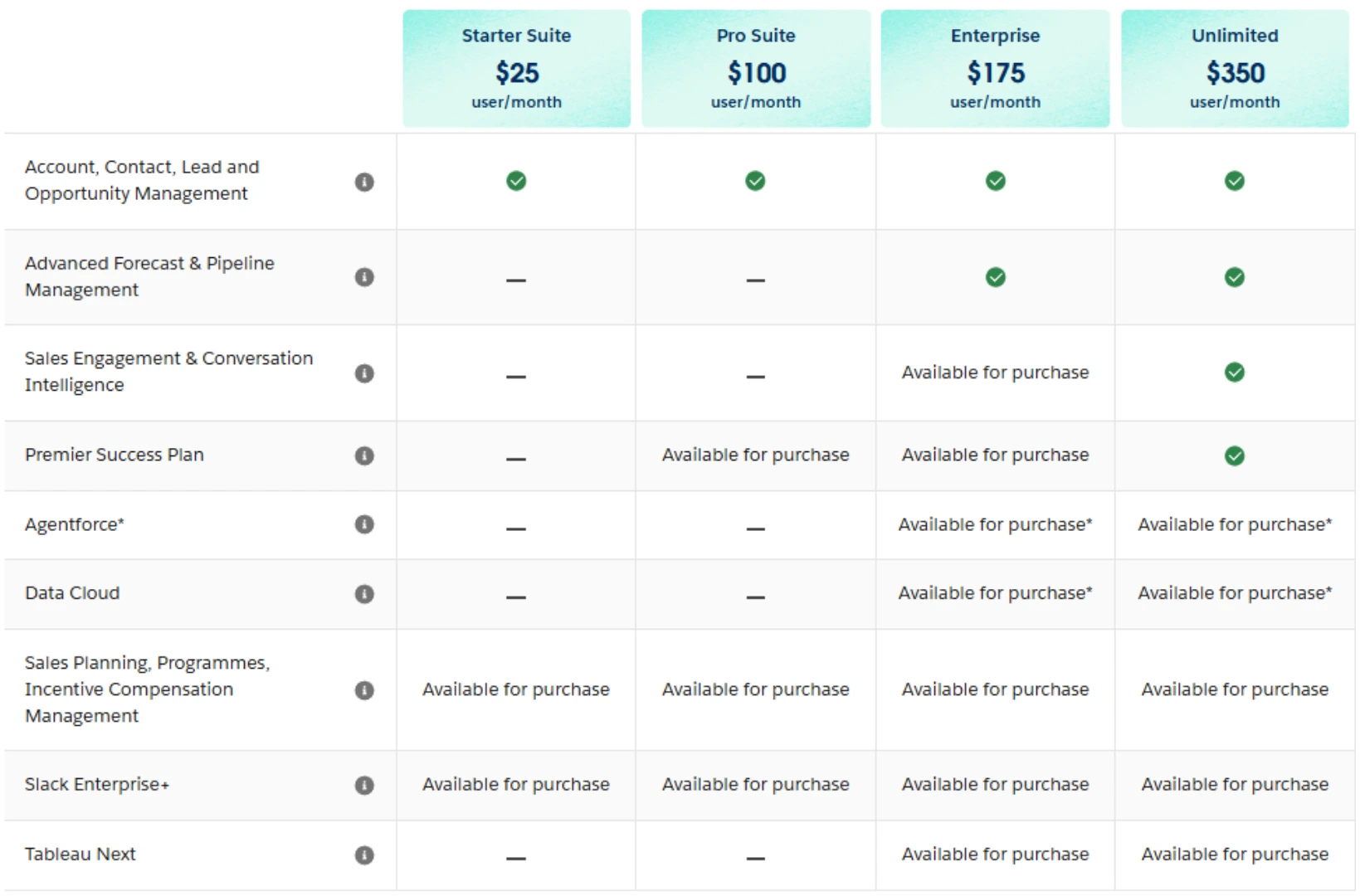
Salesforce offers multiple pricing plans with 6% price increases effective August 2025:
- Free Plan: $0 (limited to 1 user with basic sales pipeline and customer service functionality)
- Starter Suite: $25/user/month (small business bundle)
- Sales Cloud Pro: $100/user/month (annually)
- Sales Cloud Enterprise: $175/user/month (annually)
- Sales Cloud Unlimited: $350/user/month (annually)
- Agentforce 1 Sales: $550/user/month (annually)
Enterprise pricing available upon request for larger organizations requiring custom integration options.
Pricing verified December 2025, subject to change.
Our Take on Salesforce
Salesforce excels at providing comprehensive communication tools within a unified platform, particularly when businesses need built-in calling, text messaging, and email marketing capabilities integrated with their lead management system. From a CRM implementation perspective, the platform offers exceptional value for organizations wanting to consolidate multiple sales and marketing tools while improving their overall sales performance tracking.
However, the interface can feel overwhelming for teams seeking simple pipeline management, and the extensive feature set requires more initial setup time compared to simpler alternatives. Salesforce has added products through acquisition over time, so occasionally modules don't feel as well connected as one might want them to be, and new features can require additional investment. For growing companies looking to unify their sales and marketing operations and integrate other business systems, this platform provides excellent value for teams ready to leverage its full potential.
Outgrowing your current tools?
When manual workarounds start piling up, it's time for systems that scale with your business
1. Pipeline Management
Pipedrive's visual pipeline management excels through its kanban-style interface that allows sales reps to drag deals through customizable stages. The deal rotting feature automatically highlights stagnant opportunities, ensuring nothing falls through the cracks. Custom fields and pipeline customization help teams align the system with their specific sales processes.
Salesforce provides advanced pipeline management with multiple pipeline creation options, complex deal tracking across various product lines, and sophisticated forecasting tools. The platform supports intricate business rules and approval workflows that can accommodate sophisticated sales processes involving multiple decision-makers.
Winner: Pipedrive - Superior visual simplicity and immediate user adoption for most sales teams.
2. Sales Automation and Email Follow-up
Pipedrive offers essential automation features including email sequences, activity reminders, and deal progression triggers. The workflow automation helps streamline routine sales tasks, though advanced rules require Premium plans or higher.
Salesforce delivers enterprise-level automation through Flow Builder, with complex multi-step workflows, advanced lead routing, and comprehensive email marketing through Marketing Cloud. The automation capabilities can handle sophisticated business processes across departments.
Winner: Salesforce - More comprehensive automation for complex business requirements.
3. Communication Tools
Pipedrive focuses on email integration with tracking capabilities, phone logging, and basic communication management. The platform integrates well with external calling solutions through third-party integrations.
Salesforce provides omnichannel communication through Service Cloud, including built-in calling, chat, social media management, and comprehensive customer service workflows. The unified communication approach eliminates tool switching.
Winner: Salesforce - Comprehensive built-in communication across all channels.
4. Lead Generation and Web Forms
Pipedrive addresses lead generation through its Lead-Booster add-on, providing web forms, chatbots, and prospect identification tools. The lead management focuses on converting prospects through the sales pipeline efficiently.
Salesforce offers sophisticated lead generation through Marketing Cloud with advanced web forms, landing pages, lead scoring algorithms, and comprehensive campaign management. Einstein AI enhances lead qualification and routing.
Winner: Salesforce - More advanced lead generation and nurturing capabilities.
5. Customization and Integration Options
Pipedrive provides good customization for sales-focused workflows with custom fields, pipeline stages, and integration through Zapier and its marketplace. The approach prioritizes simplicity while offering necessary flexibility.
Salesforce delivers unlimited customization through Lightning Platform, custom objects, complex business logic, and thousands of AppExchange integrations. The platform can be configured for virtually any business requirement.
Winner: Salesforce - Unmatched customization and integration ecosystem.
6. User Interface and Learning Curve
Pipedrive emphasizes intuitive design with minimal training required. The interface focuses on sales activities with clear navigation and immediate productivity. Most teams achieve proficiency within hours.
Salesforce offers powerful functionality but requires more extensive training. The Lightning Experience provides modern interface design, though the breadth of features can overwhelm new users initially.
Winner: Pipedrive - Significantly easier adoption and immediate usability.
7. Reporting and Analytics
Pipedrive provides essential sales reporting with pipeline analytics, activity tracking, and deal forecasting. The insights focus on sales performance metrics and team productivity.
Salesforce delivers comprehensive reporting through Einstein Analytics with predictive insights, custom dashboard creation, and advanced business intelligence across all departments. The analytics capabilities support enterprise-level decision making. Salesforce also owns Tableau, which allows you to combine data from non-CRM sources for reporting as well, if needed.
Winner: Salesforce - More comprehensive analytics and business intelligence.
8. Customer Service and Ticketing
Pipedrive focuses primarily on sales functionality with limited customer service features. Organizations typically integrate external support tools for post-sale customer management.
Salesforce provides complete customer service management through Service Cloud with case management, knowledge base, chatbots, and omnichannel support. The service integration creates seamless handoffs from sales to support.
Winner: Salesforce - Built-in comprehensive customer service capabilities.
Your tech stack should be an accelerator, not a bottleneck
We help growing businesses build connected systems that automate repetitive work and surface the insights that matter
Pipedrive Platform Ratings

Pipedrive:
- G2: 4.3/5 based on 2,700+ reviews
- Capterra: 4.5/5 based on 3,000+ reviews
- TrustRadius: 8/10 based on verified reviews
User feedback consistently highlights Pipedrive's ease of use and user-friendly interface. One G2 reviewer noted: "Pipedrive makes sales fun and organized." However, pricing concerns emerge in user reviews: "pricing jumps quickly for growing teams."
Salesforce Platform Ratings

Salesforce:
- G2: 4.4/5 based on 12,000+ reviews
- Capterra: 4.4/5 based on 4,400+ reviews
- TrustRadius: 8.5/10 based on verified reviews
Salesforce receives praise for comprehensive functionality and enterprise capabilities. A Capterra reviewer stated: "improved visibility into our sales pipeline and helped streamline processes across departments." Users particularly appreciate the platform's comprehensive approach to sales tools and AI capabilities, though complexity is a common concern: "expense associated with Salesforce's subscription plans and additional add-ons may pose significant financial challenges."
Ratings pulled from G2, Capterra, TrustRadius on December 2025. Quotes shortened for clarity.
Pipedrive CRM
Salesforce CRM
Process Documentation Importance: Before evaluating any platform change, document your current customer relationship management processes, pain points, and success metrics. Understanding what works and what doesn't helps determine whether you need a new platform or better optimization of your existing system.
User Adoption Planning: The best customer relationship management platform is the one your team actually uses consistently. Focus on customer experience, training requirements, and change management rather than just feature comparisons when making platform decisions.
Total Cost of Ownership Considerations: Evaluate implementation costs, ongoing training, data migration, integration requirements, and potential productivity loss during transitions. Consider both immediate costs and long-term scalability when assessing sales pipeline management solutions.
Scalability Design Principles: Choose a platform that aligns with your growth trajectory. Pipedrive works well for focused sales automation, while Salesforce supports complex business processes across sales teams, marketing automation, and customer service departments.
When evaluating Pipedrive vs Salesforce, the decision deserves expert guidance that considers your complete picture rather than surface-level feature comparisons. Both platforms can deliver exceptional results, but the wrong choice costs more than money - it impacts team productivity, customer relationships, and business growth for years.
From our CRM implementation experience, the most successful projects share common characteristics: clear process documentation, realistic user adoption timelines, and alignment between platform capabilities and actual business requirements. Most companies don't realize that implementation approach often matters more than platform selection.
Whether you're optimizing your current system or evaluating alternatives, the decision between these platforms requires understanding your sales cycle optimization needs, team dynamics, growth trajectory, and integration requirements. We've seen companies transform their sales effectiveness by choosing the right platform alignment, while others struggled for years with solutions that seemed perfect on paper but failed in practice.
The wrong choice sets you back for years, while the right CRM strategy can accelerate your growth beyond expectations. Every situation is different - your business model, current processes, and growth stage all influence what approach will deliver the best results.
Rather than guessing based on feature lists or making reactive decisions during crisis situations, expert guidance helps you avoid costly mistakes that come from misaligned platform selection. The right implementation partner ensures your investment delivers measurable business results rather than becoming another underutilized software expense.
Ready to make the right choice? Contact Capital S Consulting for expert CRM selection guidance that considers your specific business requirements and long-term growth objectives.