
Here's when the Zoho CRM vs Salesforce question usually comes up: your team has outgrown spreadsheets, a basic contact tool isn't doing the job anymore, and someone's handed you demos for both platforms. They look completely different. They cost completely different. And the vendors will both tell you they're the right fit. They're not both right.
I've helped companies across private equity, medical devices, and professional services work through this decision. The answer isn't the same every time, it depends on where your team is today, where you're headed in the next two or three years, and what it actually costs to stand up either platform correctly. That's what this comparison is designed to help you figure out.
- Best for smaller budgets: Zoho CRM starts at a fraction of Salesforce's cost and deploys in weeks for straightforward sales teams
- Best for complex, scalable needs: Salesforce Sales Cloud is built for multi-team, multi-market operations, the kind of complexity Zoho starts to struggle with at scale
- Implementation timeline: Zoho typically goes live in weeks; a proper Salesforce enterprise implementation runs 3–6 months
- Platform fit: Zoho CRM is a solid match for SMBs that want real pipeline management without a heavy IT lift. Salesforce is built for organizations with complex processes, enterprise integrations, and the budget to implement it properly.
- Time to value: Zoho gets you live in weeks. Salesforce, done right, takes 3–6 months, and skipping that investment is the single most common reason it underdelivers.
- Total cost: Zoho wins on license fees. Salesforce's higher price tag is defensible when the platform is implemented correctly and actually used at scale.
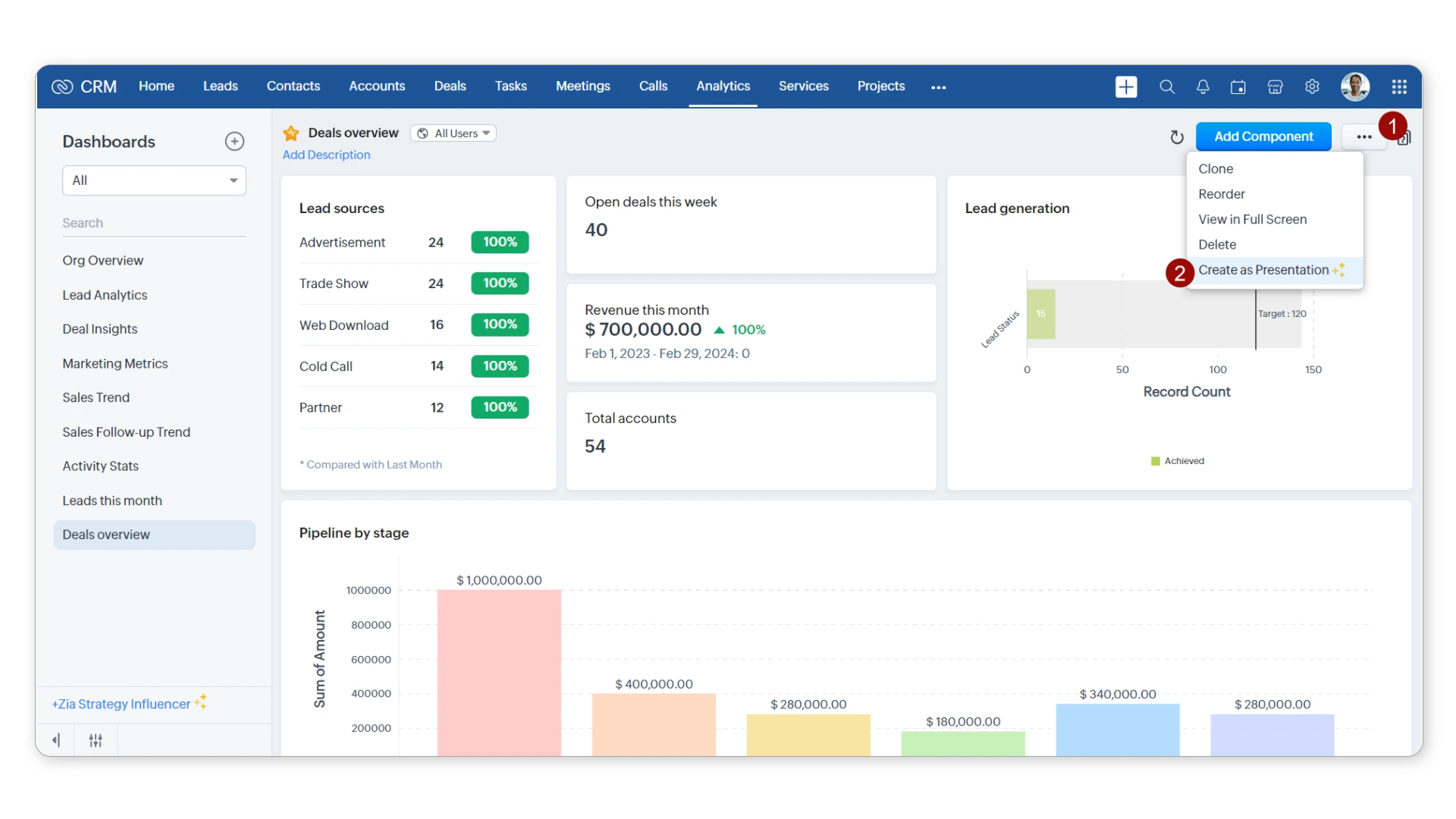
Zoho CRM is part of a broader ecosystem of 45+ business apps, but the CRM itself stands up on its own. Pipeline management, workflow automation, deal tracking, it handles all of it in one interface, and you don't need a developer to get the basic configuration right. For teams without dedicated IT resources, that's genuinely useful, not just a marketing claim.
Key Features
- Zia AI: Lead and deal scoring, anomaly detection, best-time-to-contact recommendations, email sentiment analysis, and Zia Voice for conversational access on mobile
- SalesSignals: A real-time activity feed that pulls in email, chat, and social interactions, all in one place instead of scattered across tabs
- Workflow automation: Rule-based triggers for lead assignment, follow-up tasks, and deal stage transitions
- Blueprint: A visual process builder that enforces consistent sales stages across the team, useful when you have reps who tend to skip steps
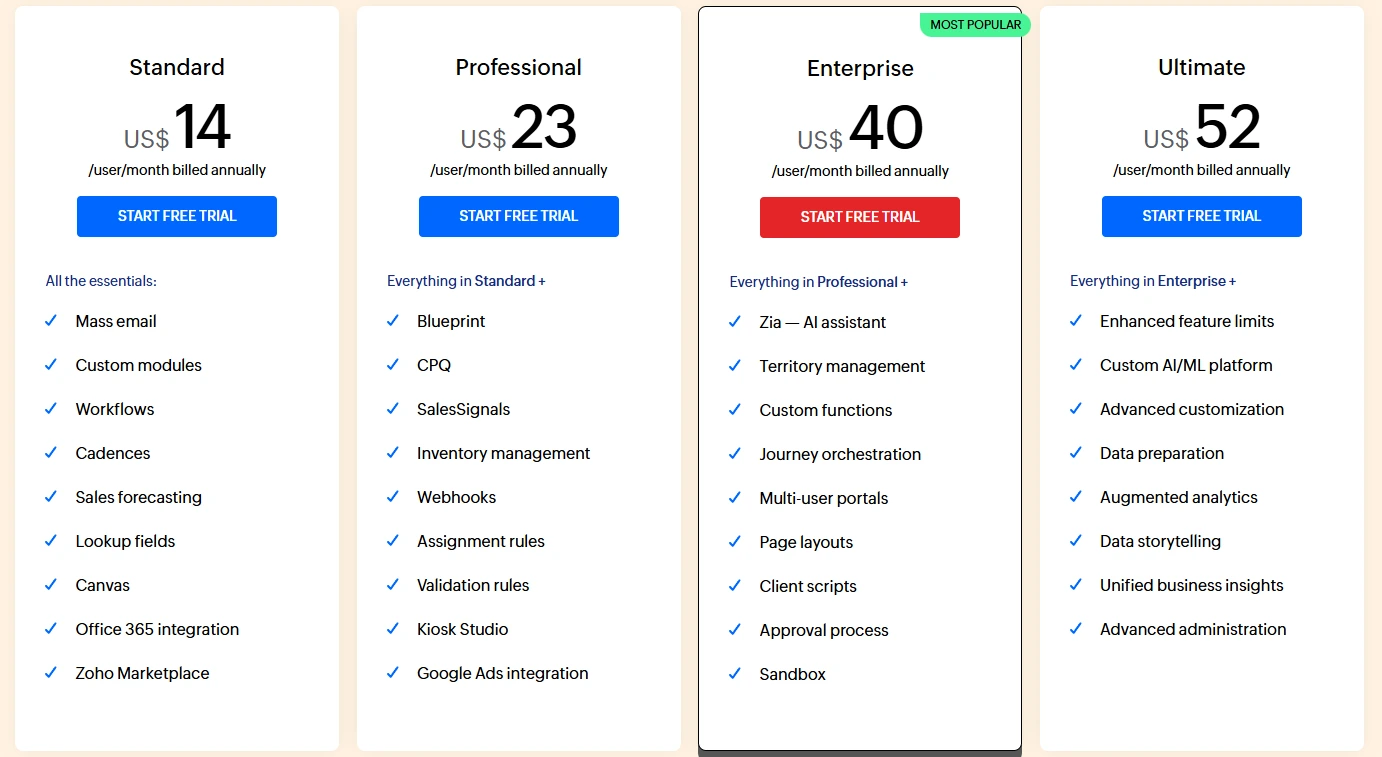
Pricing Structure
Our Take
Zoho CRM is a better platform than most people give it credit for. If your team has under 100 sales reps and you're running a reasonably linear sales process, it covers the fundamentals and then some. There is a ceiling, heavy enterprise reporting, complicated integrations, or multi-division territory management will eventually expose it. But for most growing businesses that aren't there yet, Zoho delivers real value without the overhead that comes with Salesforce.
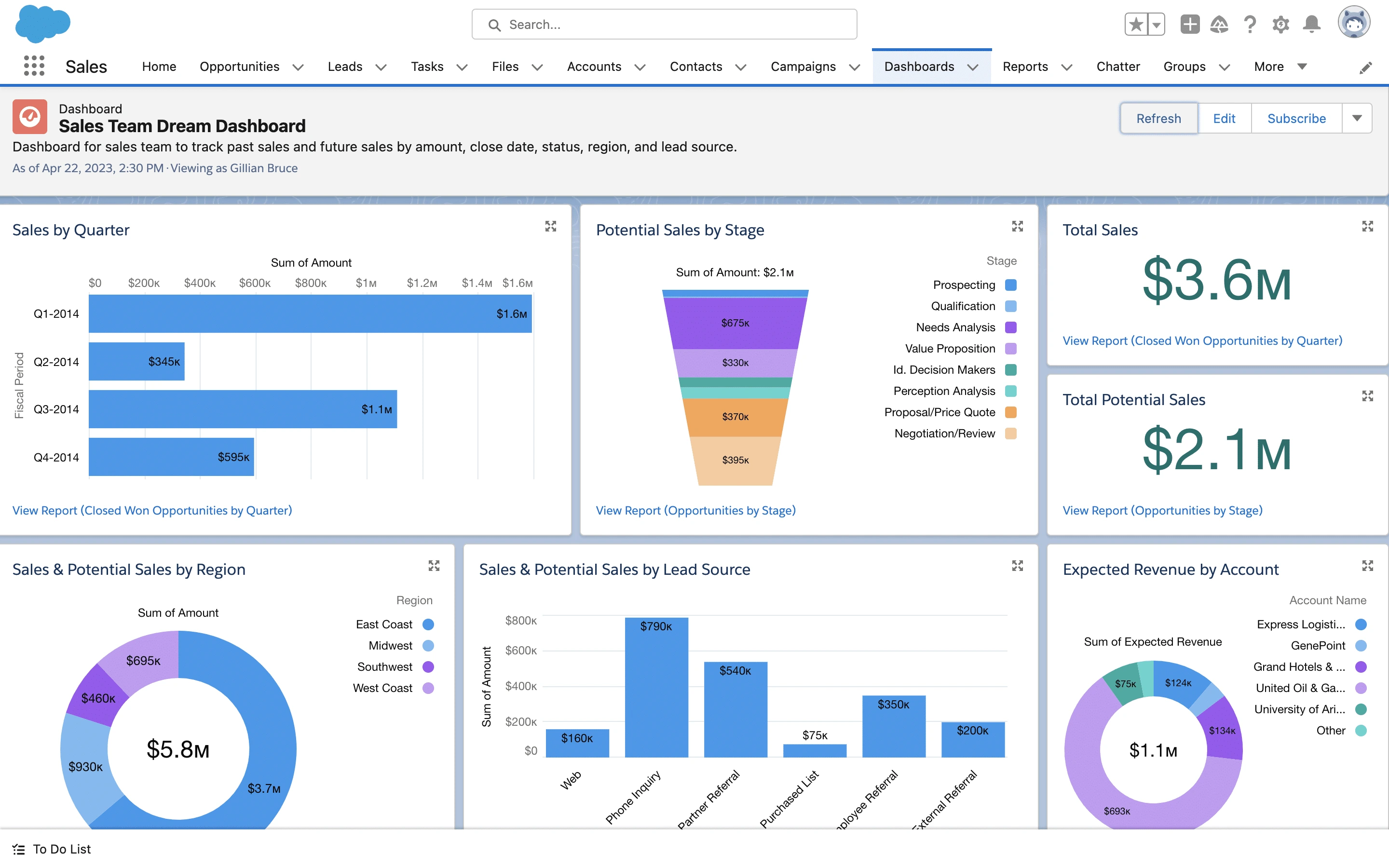
Salesforce earned its market position the hard way, by being the platform that doesn't break when your business gets complicated. Sales Cloud handles core pipeline management. Marketing Cloud, Service Cloud, and 7,000+ AppExchange integrations extend it in nearly every direction you could need. If you're running multi-team, multi-territory sales operations with overlapping reporting structures, this is the platform that was actually designed for that problem.
Key Features
- Einstein AI + Agentforce: Einstein handles predictive scoring, forecasting, and activity capture. Agentforce, launched in 2024, goes further, autonomous AI agents that can qualify leads and handle follow-ups without waiting on a human. Available on Enterprise and above.
- AppExchange: 7,000+ pre-built apps covering CPQ, document management, ERP connectors, and industry-specific tools. Most major software vendors already have a Salesforce integration built.
- Advanced forecasting: Multi-layer forecasting with quota management, hierarchy rollups, and Tableau analytics baked in at higher tiers
- Custom objects and Apex: This is where Salesforce genuinely separates itself. The ability to reshape the data model and build custom business logic in Apex lets you replicate nearly any process, something Zoho's configuration layer simply can't match
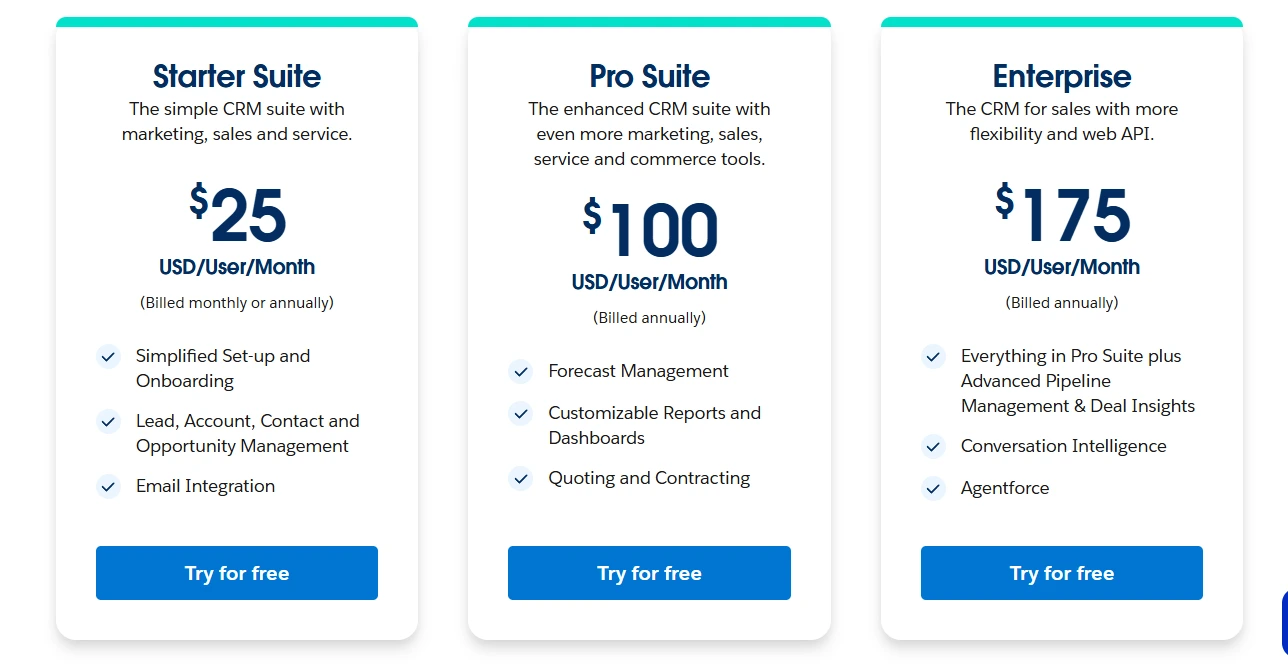
Pricing Structure
Our Take
Salesforce is the most capable CRM on the market for companies with real complexity to manage. But the risk isn't the platform, it's what happens when the implementation is rushed. A Salesforce org that skips proper configuration, loses its admin, or goes live without user training will degrade fast. We've seen it. Companies that invest in Salesforce implementation the right way end up with a system that compounds in value over time. Companies that cut corners tend to end up paying more to fix it later than they saved upfront.
Pipeline Management and Deal Tracking
Zoho handles multiple pipelines, custom deal stages, and Blueprint-enforced processes well enough for most teams. If your sales motion is relatively clean and linear, it won't let you down. But push it into territory management, opportunity splits, or hierarchy-based forecasting, things that enterprise teams deal with constantly, and you'll start hitting walls. Salesforce was purpose-built for that complexity. Overlapping territories, multi-division reporting, complex approval chains: that's exactly what Sales Cloud was designed to handle without breaking.
Winner: Salesforce for complex deal structures. Zoho is more than sufficient for straightforward pipelines.
Workflow Automation and AI
Zoho's automation handles the fundamentals well, field updates, task creation, email alerts, time-based triggers. Zia AI layers in predictive scoring and best-time-to-contact at no extra charge, which is genuinely good value at this price point. Salesforce Flow handles far more complex multi-step logic. And Agentforce isn't just an upgraded prediction engine. It deploys autonomous AI agents that can qualify leads, send follow-ups, and take action, without waiting on a rep to click anything. That's a material difference in what the platform can do on its own, and it's only available on Enterprise and above.
Winner: Salesforce. Agentforce and Flow operate in a different category. Zia delivers strong value at Zoho's price point.
Customization and Integration Options
Zoho's low-code toolset handles the common scenarios well, custom fields, page layouts, basic workflow rules. But once you need to reshape the underlying data model or build conditional logic that spans multiple objects and teams, you'll hit the ceiling quickly. Salesforce customization through Apex, custom objects, and Lightning components can replicate virtually any business process a client has thrown at us. And with 7,000+ AppExchange integrations, there's almost nothing in a modern tech stack it doesn't already connect to. Zoho's 800+ connectors cover the standard toolset well enough, it's just a fundamentally different scale of capability, not a minor gap.
Winner: Salesforce. The difference in customization depth and integration breadth is substantial, not marginal.
User Interface and Learning Curve
Zoho's interface is cleaner for everyday reps. Lower friction, faster onboarding, and you don't need a dedicated admin to configure it before it's usable. Salesforce Lightning is well-designed, but it assumes someone has done real setup work before users log in for the first time. Without that configuration, it can be overwhelming, there's just a lot there. With proper implementation, though, that investment pays off. Reps end up with a system that mirrors how they actually work, not a generic template they have to work around.
Winner: Zoho CRM on ramp time, especially for smaller teams without a dedicated Salesforce admin on staff.
Pricing and Total Cost of Ownership
Zoho wins on license cost, that's not close. But Zoho's TCO climbs as you add Analytics, extra modules, and custom integration work. Salesforce's licensing plus implementation costs are real and shouldn't be papered over. What we tell clients is this: a properly built Salesforce org tends to deliver compounding value at scale that Zoho rarely matches once you're past a certain level of complexity. But that math only works if the implementation is done right and the platform is actually maintained. Where your business is today and where it's headed in two years should drive this decision more than the sticker price.
Winner: Zoho CRM on pure licensing. Salesforce wins on long-term ROI when it's implemented and maintained correctly.
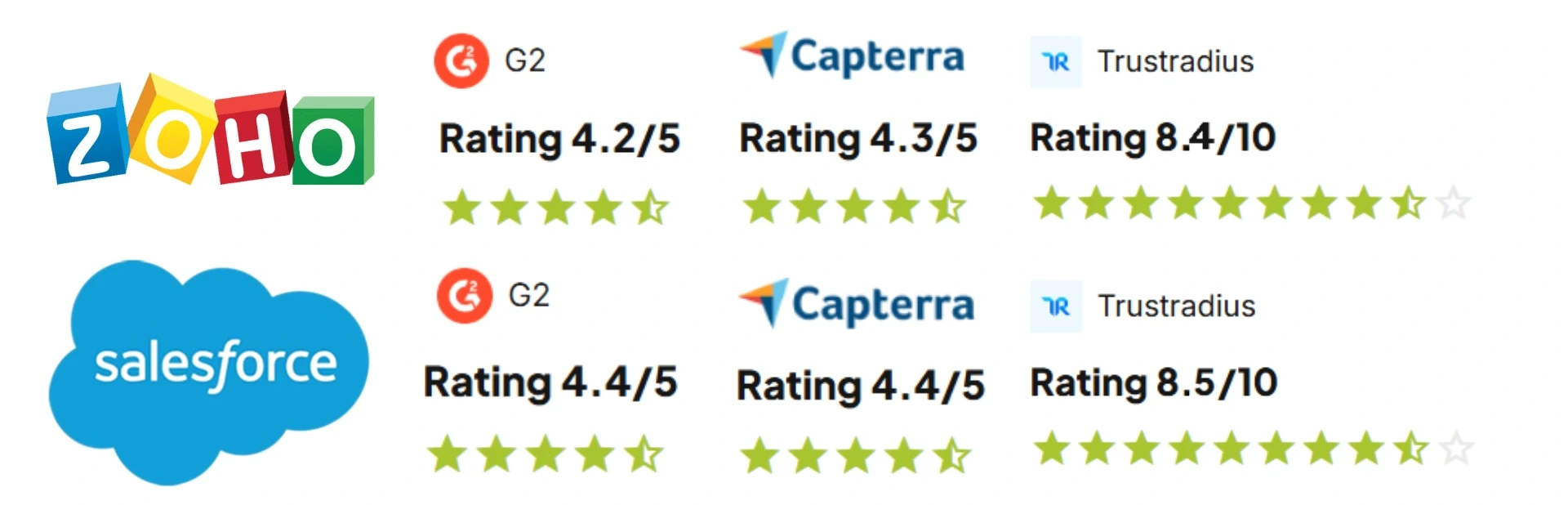
- G2: 4.1 / 5 (2,700+ reviews)
- Capterra: 4.3 / 5 (4,600+ reviews)
- What users praise: Pricing value, quick initial setup, the breadth of the broader Zoho app ecosystem
- Common complaints: Support response times on lower-tier plans, inconsistent experience when pushing into advanced configuration
- Bottom line: Strong ratings for the price point. Buyers who come in expecting Salesforce-level customization depth sometimes hit the ceiling faster than they expected.
- G2: 4.4 / 5 (23,000+ reviews)
- Capterra: 4.4 / 5 (18,000+ reviews)
- TrustRadius: 8.3 / 10 (3,200+ reviews)
- What users praise: Customization depth, integration breadth, reporting flexibility, and the platform's ability to scale without a rebuild
- Common complaints: Cost, implementation complexity, and what happens when admin support lapses
- Bottom line: The highest review volume of any CRM on the market. Negative reviews cluster around the same theme, underprepared implementations. That's a solvable problem, but only if you treat it as one going in.
Zoho CRM
Salesforce
Start with process, not features
Document your actual sales process before touching any configuration. Not the ideal version, the real one. What do deal stages actually mean in your business? Teams that skip this spend the first six months reconfiguring things. Teams that do it spend a week on documentation and avoid that entirely.
Budget for adoption, not just implementation
The most technically correct CRM setup doesn't help if reps log in once and go back to email. Training needs to show people why the CRM makes their job easier. If leadership isn't pulling reports and holding the team accountable for data quality, adoption stalls, regardless of how good the configuration is.
We've implemented both platforms across a range of industries. Here's the honest version of how we think about this decision with clients.
Zoho CRM is the right call for a lot of businesses, particularly those under 100 sales users running a reasonably standard process who don't have the budget or internal resources for a full Salesforce buildout. It's not a consolation prize. For the right company, it's the right platform.
Salesforce makes sense when you have real complexity to manage: multiple teams, territories, or business units; deep integration requirements; advanced forecasting needs; or a growth trajectory that will genuinely outpace what Zoho can handle. The investment is higher, but so is the ceiling.
What we push back on is the idea that you can shortcut either implementation. We've cleaned up Zoho orgs that were configured by someone who left six months ago and Salesforce orgs that went live without user training and never recovered. The platform matters less than the plan.
If you're still working through this decision, we're happy to talk through it. No sales pitch, just a direct conversation about what your business actually needs.
Is Zoho CRM or Salesforce better for small and mid-sized businesses?
Most SMBs don't need Salesforce. That's not a knock on the platform. It's just the honest read. Zoho starts at $14/user/month, deploys in weeks, and doesn't require a dedicated admin to keep it running. For teams under 100 reps with a reasonably standard sales process, it covers the fundamentals and then some. Where businesses go wrong is buying Salesforce because it sounds more serious, then spending the first year fighting the configuration. Salesforce earns its place when the complexity is real: overlapping territories, multi-team forecasting, or integration requirements that Zoho genuinely can't handle.
How do the total costs of Zoho CRM and Salesforce compare?
The license is only the beginning. Zoho runs $14 to $52/user/month. Salesforce starts at $25 but most businesses end up at Pro Suite ($100) or Enterprise ($175). Then comes implementation, typically $15,000 to $60,000+ for a proper Salesforce buildout, plus whoever manages the platform after go-live. Companies that plan for that full number make a real ROI decision. Companies that only budget for the license end up cutting corners on implementation. That's exactly where Salesforce projects go sideways. All in, Salesforce usually costs three to five times more annually than a comparable Zoho deployment.
How difficult is it to switch from one platform to the other?
The data move is the easy part. Contacts, accounts, open deals: manageable. What takes real time is everything built on top of them. Custom fields, workflow rules, email templates, report structures, integrations with your other tools. None of that migrates automatically. Going from Salesforce to Zoho is the harder direction. By the time most companies want to leave Salesforce, they've built years of customization into it. Budget 4 to 8 weeks minimum for a clean migration. Rush it, and you'll be untangling data quality problems long after go-live.
When should a business get expert help with this decision?
Earlier than you think. The decisions made in the first few weeks of a CRM project, how the data model is structured, how pipelines are set up, which integrations get built, set the ceiling for everything that comes after. Get those wrong and you're not just configuring a CRM. You're building a problem someone will have to fix later. If you have more than one pipeline, existing tool integrations, or a team of five or more reps, the stakes are real. We give a straight answer: which platform fits, what it actually costs, and what a realistic timeline looks like.